

If you have ever worked with PX4 or ArduPilot open-source flight controllers, you have heard of MAVLink. MAVLink (Micro Air Vehicle Link) is a lightweight, open-source binary communication protocol designed for communication between drones, ground stations, and onboard components. It is the universal language of the drone world — enabling flight controllers, ground stations, companion computers, gimbals, and cameras to talk efficiently using the same protocol.
This article provides a comprehensive MAVLink guide: what it is, how messages are structured, how to use and parse them from raw bytes, and how to define custom messages. By the end, you will have a complete MAVLink knowledge framework for drone development.
Official MAVLink site: https://mavlink.io/en/
Key Takeaways
- MAVLink is a binary protocol with only 8–14 bytes of header overhead — far more efficient than JSON/XML for low-bandwidth telemetry links
- v2.0 supports 24-bit message IDs (up to 16 million messages), message signing for secure links, and payload truncation for bandwidth savings
- Message fields are ordered by type size (largest first) and all multi-byte fields use little-endian byte order — a common trap for hand-written parsers
- Custom messages are defined via XML dialects; use ID range 25600+ for private experimental use without registration
- Aomway offers telemetry and video transmission systems compatible with MAVLink-based drone platforms for reliable real-time data links
1. What Is MAVLink?
1.1 Definition & Positioning
MAVLink (Micro Air Vehicle Link) is a lightweight, open-source binary communication protocol designed for drones, ground stations, and robotic systems. Created by Lorenz Meier at ETH Zurich in 2009, it is licensed under LGPL and has become the de facto standard in open-source drone development — supported by PX4, ArduPilot, Pixhawk, Parrot, and all major platforms.
Core features:
- Lightweight: v1 header is only 8 bytes; v2 header is 14 bytes (27 with signing)
- Efficient: Binary encoding — significantly smaller than JSON/XML
- Reliable: CRC-16 checksum + sequence number for packet loss detection
1.2 Design Pattern: Publish-Subscribe + Point-to-Point
MAVLink uses a hybrid design:
- Publish-subscribe: Telemetry streams (attitude, position, heartbeat) broadcast periodically as topics; receivers parse on demand. No ACK required, suitable for high-frequency telemetry.
- Point-to-point: Configuration sub-protocols (parameter protocol, mission protocol) use request-response + retransmission for reliable delivery.
1.3 System & Component Addressing
Every device in a MAVLink network has a two-level address:
| Field | Length | Description |
|---|---|---|
| System ID (sysid) | 1 byte | Identifies a complete system (one drone, one GCS). Drones typically start from 1, GCS from 255 |
| Component ID (compid) | 1 byte | Identifies a component within a system (flight controller, IMU, gimbal, camera) |
1.4 MAVLink v1 vs v2
| Feature | MAVLink v1.0 | MAVLink v2.0 |
|---|---|---|
| Start byte (STX) | 0xFE | 0xFD |
| Message ID | 8 bit (0–255) | 24 bit (0–16,777,215) |
| Max payload | 255 bytes | 255 bytes |
| Header overhead | 8 bytes | 12 bytes (without signing) |
| Signing | Not supported | Optional (+13 bytes) |
| Payload truncation | Not supported | Zero-value truncation supported |
v2 is backward-compatible. New projects should use v2 directly.
2. MAVLink Frame Structure
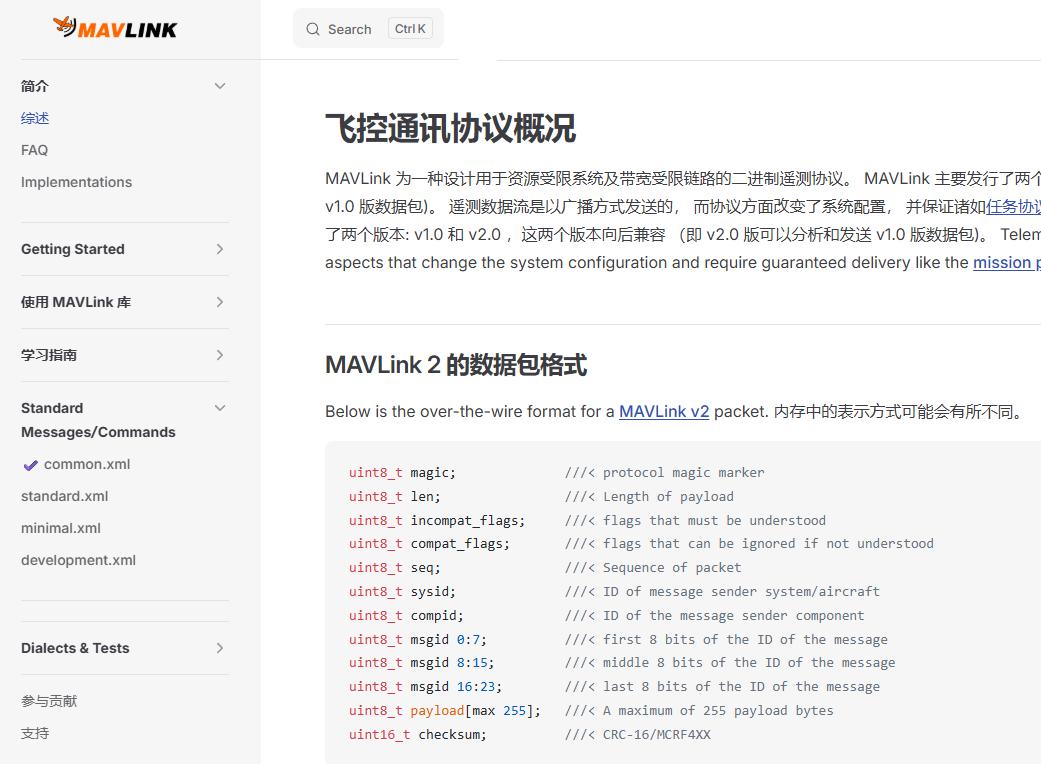
2.1 v2 Frame Structure
| Offset | Field | Type | Description |
|---|---|---|---|
| 0 | magic (STX) | uint8_t | Frame start, always 0xFD |
| 1 | len | uint8_t | Payload length |
| 2 | incompat_flags | uint8_t | Must understand or discard |
| 3 | compat_flags | uint8_t | Can ignore if not understood |
| 4 | seq | uint8_t | Packet sequence (0–255) |
| 5 | sysid | uint8_t | Sender system ID |
| 6 | compid | uint8_t | Sender component ID |
| 7–9 | msgid | uint24_t | Message ID (little-endian) |
| 10 → +len-1 | payload | uint8_t[] | Message payload |
| +len → +len+1 | checksum | uint16_t | CRC-16/MCRF4XX |
| +len+2 → +len+14 | signature | uint8_t[13] | Optional message signature |
3. MAVLink Message Categories
MAVLink messages are organized into several functional categories:
(a) Core & Heartbeat
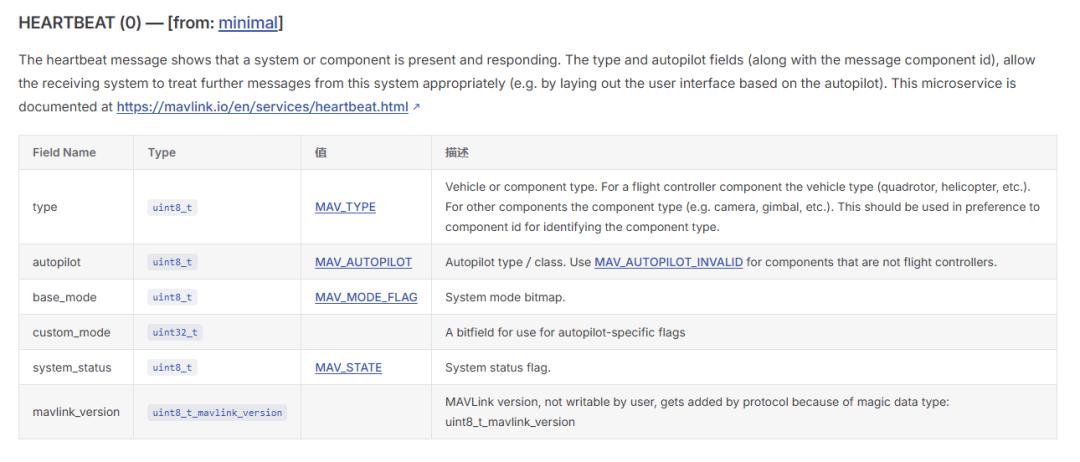
- HEARTBEAT (#0): 1 Hz periodic signal indicating device online status. Contains system type, autopilot type, mode, and state.
- SYS_STATUS (#1): Battery, sensor health, CPU load
- PING (#4): Link latency measurement
(b) Telemetry Stream Data
- ATTITUDE (#30), GLOBAL_POSITION_INT (#33), LOCAL_POSITION_NED (#32)
- GPS_RAW_INT (#24), HIGHRES_IMU, SCALED_IMU
- RC_CHANNELS (#65)
(c) Command & Control
- COMMAND_LONG (#76): 7-param command for arming, takeoff, landing, mode switch
- COMMAND_INT (#75): Higher-precision position commands
- COMMAND_ACK (#77): Command execution result
(d) Parameter Protocol
- PARAM_REQUEST_READ / PARAM_REQUEST_LIST / PARAM_VALUE / PARAM_SET
(e) Mission & Waypoint Protocol
- MISSION_COUNT, MISSION_REQUEST_INT, MISSION_ITEM_INT, MISSION_ACK, MISSION_CURRENT
4. How to Use MAVLink in Development
4.1 C Library (mavlink C headers)
The official MAVLink code generator produces pure header-only C libraries. Include the header and use directly — no compilation needed.
Example — packing and sending a HEARTBEAT message:
#include <mavlink/v2.0/common/mavlink.h>
uint8_t buf[MAVLINK_MAX_PACKET_LEN];
mavlink_message_t msg;

// Pack heartbeat
mavlink_msg_heartbeat_pack(
    sysid, compid, &msg,
    MAV_TYPE_QUADROTOR,
    MAV_AUTOPILOT_PX4,
    base_mode,
    custom_mode,
    MAV_STATE_ACTIVE
);

// Serialize to byte buffer
uint16_t len = mavlink_msg_to_send_buffer(buf, &msg);
uart_send(buf, len);
4.2 Parse State Machine
MAVLink parsing uses a state machine that processes one byte at a time. The official C library function mavlink_parse_char() handles frame sync, CRC validation, and v1/v2 auto-detection internally.
4.3 Understanding Raw Byte Parsing
Many developers use library functions without understanding what happens under the hood. Here is the complete flow using a HEARTBEAT message example.
Raw v2 HEARTBEAT bytes:
FD 09 00 00 00 01 01 00 00 00 02 03 04 05 06 07 5B 3F| Byte | Value | Field | Notes |
|---|---|---|---|
| 0 | 0xFD | magic | v2 frame start |
| 1 | 0x09 | len | Payload = 9 bytes |
| 2 | 0x00 | incompat_flags | None |
| 3 | 0x00 | compat_flags | None |
| 4 | 0x00 | seq | Sequence = 0 |
| 5 | 0x01 | sysid | System ID = 1 |
| 6 | 0x01 | compid | Component ID = 1 |
| 7–9 | 0x00 0x00 0x00 | msgid | Message ID = 0 (HEARTBEAT) |
| 10–18 | 9 bytes payload | payload | See field breakdown below |
Payload field order (sorted by type size, descending):
| Offset | Field | Type | Size |
|---|---|---|---|
| 0 | custom_mode | uint32_t | 4 bytes |
| 4 | type | uint8_t | 1 byte |
| 5 | autopilot | uint8_t | 1 byte |
| 6 | base_mode | uint8_t | 1 byte |
| 7 | system_status | uint8_t | 1 byte |
| 8 | mavlink_version | uint8_t | 1 byte |
Two common pitfalls:
- Byte order: All multi-byte fields are little-endian (least significant byte first)
- Field order: Not the XML definition order — fields are sorted by type size descending (largest first) for natural alignment without padding
When you call mavlink_msg_heartbeat_decode(&msg, &hb), internally it simply reads bytes from msg.payload at the correct offsets and converts little-endian to host byte order. At its core, it is a typed memcpy with byte-order conversion.
5. MAVLink Debugging Tools
5.1 QGroundControl (QGC)
The most widely used open-source ground station. Built-in MAVLink Inspector shows real-time message streams with filtering by ID. MAVLink Console provides direct NuttX shell access over MAVLink.
5.2 Common Troubleshooting
| Issue | Likely Cause | Solution |
|---|---|---|
| No messages received | Baud rate mismatch, crossed TX/RX | Check with oscilloscope; verify TX/RX crossover |
| Garbled data, CRC errors | v1/v2 version mismatch | Check frame header: 0xFE = v1, 0xFD = v2 |
| Partial parse failures | Mismatched message definitions | Verify matching mavlink library versions |
| High packet loss | Bandwidth insufficient; processing too slow | Reduce transmit rate; optimize receiver processing |
| Commands sent but no response | Wrong target sysid/compid | Verify target_system/target_component in command |
6. How to Create Custom MAVLink Messages
6.1 Two Approaches
- Create a custom dialect (recommended): Create a new XML file including common.xml with your custom messages.
- Modify common.xml directly: Not recommended unless contributing upstream.
6.2 XML Message Definition
<?xml version="1.0"?>
<mavlink>
  <include>common.xml</include>
  <enums>
    <enum name="MY_CUSTOM_STATUS">
      <entry value="0" name="MY_STATUS_IDLE"/>
      <entry value="1" name="MY_STATUS_WORKING"/>
    </enum>
  </enums>
  <messages>
    <message id="25600" name="MY_CUSTOM_DATA">
      <description>Custom data message</description>
      <field type="uint32_t" name="timestamp_ms">Timestamp</field>
      <field type="float" name="temperature" units="degC">Temperature</field>
      <field type="float" name="pressure" units="hPa">Pressure</field>
      <field type="uint8_t" name="status" enum="MY_CUSTOM_STATUS">Status</field>
      <field type="char[32]" name="device_name">Device name</field>
    </message>
  </messages>
</mavlink>
6.3 Message ID Allocation
- 0–254: v1 compatibility zone
- 256–14999: Standard MAVLink messages
- 15000–23999: Third-party projects (register on MAVLink repo)
- 25000–25599: Vendor custom extension zone
- 25600+: Private experimental use, no registration required
6.4 Code Generation
# 1. Clone MAVLink repository
git clone https://github.com/mavlink/mavlink.git
cd mavlink
git submodule update --init --recursive

# 2. Install Python deps
pip3 install pymavlink future

# 3. Place XML in message_definitions/v1.0/

# 4. Generate C headers (v2 protocol)
python3 -m pymavlink.tools.mavgen \
  --lang=C \
  --wire-protocol=2.0 \
  --output=./generated_c/ \
  ./message_definitions/v1.0/my_dialect.xml
Generated functions per message: pack(), encode(), decode(), send(), plus individual field getters.
7. Practical Considerations
- Stick to standard messages when possible — reduces maintenance burden
- Keep identical definitions on both ends — mismatched versions cause parse failures
- Consider contributing upstream if your custom message solves a common need
Mastering MAVLink is essential for serious PX4/ArduPilot development. Whether you are building a custom ground station, integrating a companion computer, or developing a specialized drone payload, understanding MAVLink at the byte level gives you full control over your communication pipeline.
If you have any questions about MAVLink integration or need telemetry/data link solutions for your drone platform, feel free to contact us at [email protected].


Have questions about this article? Feel free to contact us at [email protected] — we’re happy to help!
Frequently Asked Questions
1. Should I use MAVLink v1 or v2 for new projects?
Always use v2. It provides 24-bit message IDs (vs. 8-bit in v1), supports message signing for security, and payload truncation for bandwidth savings. v2 is backward-compatible with v1 parsers.
2. What bandwidth does MAVLink consume in practice?
A typical HEARTBEAT (1 Hz) costs ~18 bytes/s. Full telemetry (ATTITUDE + GLOBAL_POSITION_INT + SYS_STATUS at 5–10 Hz each) typically uses 500–2000 bytes/s — well within the capacity of 57600+ baud telemetry radios. Aomway telemetry systems support standard MAVLink data rates with headroom.
3. Can I use MAVLink over Wi-Fi or 4G?
Yes. MAVLink works over any transport (serial, UDP, TCP). Over Wi-Fi or 4G, use UDP for telemetry (tolerates packet loss) and TCP for mission/parameter protocols (needs reliability). Aomway offers 4G LTE telemetry solutions for beyond-visual-line-of-sight (BVLOS) operations.
4. How do I handle MAVLink signing for secure drone links?
MAVLink v2 supports optional link signing using a pre-shared 32-byte key. Each message gets a 13-byte signature (SHA-256 hash with timestamp). Enable it by setting the signing flag in incompat_flags and configuring the same key on all connected devices.
5. What is the best way to log MAVLink data for post-flight analysis?
PX4 stores .ulog files internally. ArduPilot uses .bin/.log files. For companion computers, use mavlink-router or MAVSDK logging. QGroundControl also records telemetry logs. These logs can be analyzed with pyulog, Mission Planner, or FlightPlot.
