

Key Takeaways: esp32flight turns a $15-35 ESP32-S3 touchscreen dev board into a fully standalone desktop flight radar—no Raspberry Pi, no server, no subscription, no API keys required. It pulls data from free community ADS-B sources (or your local RTL-SDR receiver), tracks up to 80 aircraft within a configurable 1-250 nautical mile radius, and shows routes, altitude, speed, maps, and plane photos. Five views including a retro CRT radar; browser-based one-click firmware flashing; ntfy.sh alerts for emergency squawks (7500 hijack, 7600 radio failure, 7700 emergency); MQTT + Home Assistant auto-discovery; and OTA updates via the built-in web panel. There’s even an Android APK of the same code. A $35 device doing what used to require a full computer—exactly the kind of hardware-optimized ingenuity Aomway builds into our FPV systems.
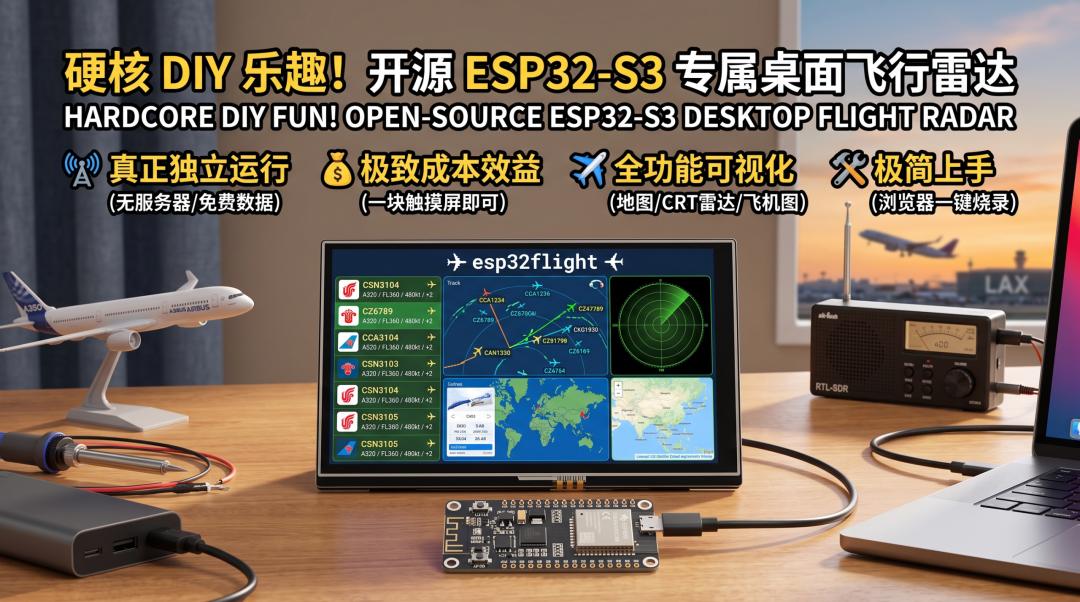
Tired of only seeing flight paths on your phone or a website? Want a dedicated desktop flight radar that keeps you updated on flights overhead at all times? Today’s open-source project turns your ESP32-S3 dev board into a powerful standalone flight radar—with a touchscreen! Best of all: no Raspberry Pi, no server, no subscription fees, no API keys. Out-of-the-box, pure hardcore DIY fun. Embedded players and aviation enthusiasts, this one’s for you!
What It Is in One Sentence
esp32flight is a standalone desktop flight radar project based on the ESP32-S3 dev board. Using a 7-inch (or 4.3-inch) touchscreen, it displays aircraft information around you in real time—routes, altitude, speed, even maps and plane photos.
Why It’s Worth Your Attention
- Truly standalone: the project’s biggest highlight is full independence—no extra server, no Raspberry Pi, not even any third-party API key required. All data comes directly from free community ADS-B sources (or your local RTL-SDR receiver), delivering a genuine “serverless” experience.
- Extreme cost-effectiveness: core hardware is just one ESP32-S3 touchscreen board—the 7-inch Waveshare ESP32-S3-Touch-LCD-7 is ~$35, the 5-inch Guition JC8048W550 ~$20, and the 4.3-inch low-res Sunton ESP32-4827S043 is only ~$15. Incredible value.
- Feature-rich and visual: 5 views total—list+detail, auto-rotating ambient mode, real map radar (with nearby airport runways), session statistics page, and a retro CRT radar. It can also track ISS, SondeHub weather balloons, and AIS ships (ship and airspace outline layers need free keys you apply for yourself). All info at a glance.
- Minimal onboarding: flash the firmware with one click from a browser—no development environment setup. Even beginners can try it easily.
- Highly customizable and integrable: night mode, 7 color themes, one-click aviation/metric unit switching, English/Polish bilingual UI, ntfy.sh emergency alerts and overflight notifications, MQTT to Home Assistant. Unlimited possibilities.
- C implementation, efficient and lightweight: core code is written in C, ensuring smooth operation on resource-constrained devices like the ESP32.
The 3 Most Interesting Features
- Full-featured real-time flight radar with data display.
It’s not just a point-to-point flight display. Detection radius is configurable from 1 to 250 nautical miles (~463 km); the device tracks up to 80 aircraft simultaneously, showing the nearest 40 in the list—including airline logos, aircraft type, altitude (with trend arrows), speed, and distance. Tap a flight for more detail: full route, departure/arrival airports, estimated arrival time, squawk, ADS-B category, and plane photos from planespotters.net. You can even overlay airspace control zones, weather balloons, and AIS ships. Multiple view modes, including radar trails on a real map and retro CRT style—whatever your visual preference. - “Zero-barrier” integration and smart alerts.
esp32flightisn’t just standalone—it’s “smart.” Set up a watchlist and specific flights highlight when they enter range. Even better: it pushes emergency squawks (7500 hijack, 7600 radio failure, 7700 emergency) or overflight alerts for watched flights to your phone via ntfy.sh. For smart home players, it supports MQTT with Home Assistant auto-discovery—easily integrate flight data into your smart scenes, like “living room lights change color when a plane flies overhead”! - Built-in web panel and over-the-air firmware updates.
Visithttp://esp32flight.localin your browser for the project’s web admin panel. Tabs: Live (Leaflet map + flights table), History (observation logs exportable to CSV, alert history), Settings (full config with per-item explanations), API (built-in endpoint reference). Best of all, future firmware updates go straight through this web panel via OTA—no more USB cables. Flash once, update forever. Note: OTA is locked by default; unlock it on the device first.
Hands-On: Installation / Quick Start
Getting started is extremely simple—the project provides an official browser installer. No development toolchain needed!
Requirements:
You need a Waveshare ESP32-S3-Touch-LCD-7 (~$35), its 4.3-inch sibling, or a Guition JC8048W550 (~$20) board, plus a USB cable. Make sure your browser is Chrome or Edge. 16MB flash boards share one firmware (auto-detects hardware on boot); the 4.3-inch version ships with an 8MB flash module (WROOM-1 N8R8), so flash the dedicated esp32flight-vX.Y.Z-8mb-full.bin.
- Prepare hardware.
Get any of the ESP32-S3 touchscreen boards above and connect it to your computer via USB. - Open the browser installer.
In Chrome or Edge, open:
https://theqkash.github.io/esp32flight/You should see: a clean web page with an “Install” button in the middle.
- One-click firmware flash.
Click “Install.” The browser prompts you to select a serial port—choose the one for your ESP32 board, click “Connect,” and confirm installation. Entirely browser UI, zero command line.
Expected: installation progress bar; the device reboots automatically when done. - Configure Wi-Fi.
All done on the device touchscreen: tap the gear icon, pick your 2.4 GHz Wi-Fi from the scanned list, enter the password, save.
Expected: device connects to Wi-Fi, locates itself from your IP (or a manually entered city), and starts tracking nearby flights. - Start tracking flights.
Once connected and located, it automatically displays flights around you. Enjoy your desktop flight radar!
Expected: real-time updating flight list and radar view on the touchscreen.
Ways to Use It
- Dedicated desktop flight radar: put it on your desk, office, or living room as a unique conversation starter—always aware of what’s overhead.
- Smart home integration: push flight data via MQTT to Home Assistant for custom automations, e.g., trigger when a specific aircraft type flies over.
- Aviation learning station: kids can intuitively learn about planes, routes, and air traffic control—edutainment made fun.
- Portable “aviation scout”: pair it with a power bank and take it outdoors—a portable aviation observation station near airports or open areas.
- Data analysis platform: the built-in web panel exposes a pure HTTP API on port 80 (
/api/statereal-time JSON,/api/logobservation history,/api/alertsalert history) plus Prometheus/metrics, and you can grab an 800×480 real-time screenshot directly via/screen.bmp. Great for secondary development and data analysis. - Try it on your phone first: no board? No problem—the same core code is also compiled into an Android APK (Android 5.0+, phones and tablets), downloadable from the Releases page and sideloaded. Feature-identical to the firmware version.
Who It’s For
- Makers / embedded players: you love DIY, are curious about ESP32, and want complex functionality from cheap hardware.
- Aviation enthusiasts / aerial photography fans: track flights in real time, learn aviation info, even predict the best shooting windows.
- Smart home players: fold more real-time environmental data into your smart life and explore MQTT integration fun.
- Geeks / DIYers: you love exploring open-source projects, value independence, and refuse to be locked into commercial subscriptions.
GitHub
https://github.com/theqkash/esp32flightIf you have any questions about this topic, feel free to contact us at [email protected]
Have questions about this article? Feel free to contact us at [email protected] — we’re happy to help!
Frequently Asked Questions
Q1: What is esp32flight and what hardware does it need?
esp32flight is an open-source standalone desktop flight radar built on an ESP32-S3 touchscreen dev board. No Raspberry Pi, server, subscription, or API keys—data comes from free community ADS-B sources or your local RTL-SDR receiver. Compatible boards: Waveshare ESP32-S3-Touch-LCD-7 (~$35), Guition JC8048W550 (~$20), or Sunton ESP32-4827S043 (~$15).
Q2: What can the flight radar actually display?
Up to 80 aircraft tracked within a configurable 1-250 nautical mile radius (nearest 40 shown in the list), with airline logos, aircraft type, altitude trend arrows, speed, and distance. Tap for details: full route, airports, ETA, squawk, ADS-B category, planespotters.net photos, plus overlays for airspace zones, weather balloons, and AIS ships. Five views including real-map radar trails and retro CRT.
Q3: How do I install it?
No toolchain needed. Open https://theqkash.github.io/esp32flight/ in Chrome or Edge, click Install, select the board’s serial port, and flash. Configure Wi-Fi on the touchscreen, and it starts tracking immediately. The 4.3-inch board (8MB flash) needs the dedicated esp32flight-vX.Y.Z-8mb-full.bin firmware.
Q4: Can it send alerts or integrate with smart home?
Yes. ntfy.sh pushes emergency squawks (7500 hijack, 7600 radio failure, 7700 emergency) and overflight alerts for watched flights to your phone. MQTT with Home Assistant auto-discovery enables automations like light color changes when planes fly over. OTA firmware updates go through the built-in web panel at http://esp32flight.local.
Q5: What if I don’t have the board yet?
An Android APK (Android 5.0+) built from the same core code is available on the Releases page—sideload it and get identical functionality on your phone or tablet. Or use the web panel’s HTTP API (/api/state, /api/log, /api/alerts) and Prometheus /metrics for data analysis without dedicated hardware.
