
Key Takeaways
- IMU accuracy is limited by mounting stress more often than by sensor grade; reflow heat, screw torque and board bow are the main sources.
- SMD IMU modules trade serviceability for compactness — rework needs controlled heating and the vendor footprint should not be modified.
- Some IMU datasheets require a PCB substrate of 2.0 mm or thicker specifically to limit board flex under the part.
- Pads, copper and vias should stay symmetric around the module centre to avoid thermal and stiffness gradients.
- Four standards govern the work: IPC-2221, IPC-A-610, J-STD-001 and JEDEC J-STD-020.
IMU mounting stress is the most common reason a good inertial sensor performs badly in a finished product. The sensor grade matters far less than how the part is attached: reflow heat, board bow, screw torque and harness pull all reach the sensing element through the joint. This guide, current as of 2026, splits IMU modules into SMD and structural types and lists the design rules that keep bias stable.
Earlier articles in this series covered individual sensors and pre-packaged IMU modules. This one covers the hardware integration stage — the handling steps that are routinely skipped, and that decide whether the IMU can be used well at all.
Two IMU Package Types: SMD and Structural Mount
For hardware integration, IMU devices fall into two practical categories.
1. SMD (PCB-mounted) modules
This covers a bare sensor chip, or a sensor chip that a module vendor has packaged into a small PCB-mount part. Both are grouped as SMD types.
(a) Bare sensor, no additional processing. The pads are laid out directly and the part is soldered onto the PCB.
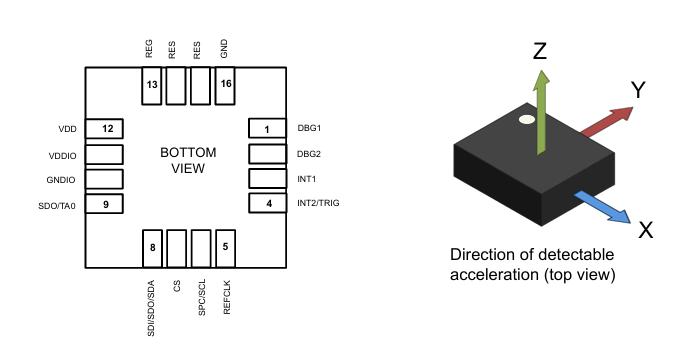
Image source: public internet, used only to illustrate the mounting method.
(b) Vendor-packaged module that still requires soldering. The module vendor has added one level of packaging, but the part is still a board-mount component.
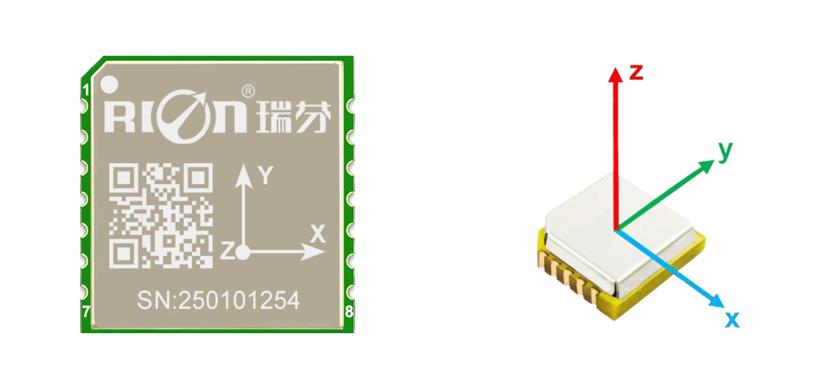
Image source: public internet, from a domestic vendor’s published material, used only to illustrate the mounting method.
SMD modules are normally attached by SMT reflow in LGA, QFN, BGA or similar bottom-pad packages.
2. Structural (bracket-mounted) modules
The defining feature of this type is that no PCB footprint is needed. The module is matched to the mechanical structure and fastened in place.
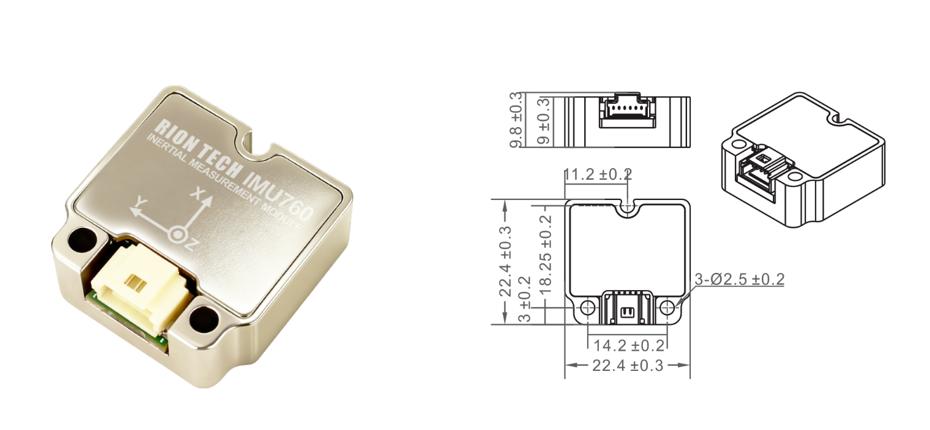
Bracket-mounted modules connect to the main board and structure through connectors, screws, brackets, clips or harnesses.
Why Mounting Stress Matters More Than the Datasheet
Board flex, oversized screw torque and similar assembly problems create stress that directly degrades measurement accuracy. Both module types share one principle — keep the sensor in a repeatable, low-gradient, low-residual-stress mounting environment — but the methods differ.
| Dimension | Bracket-mounted module | SMD module |
|---|---|---|
| Typical connection | Connectors, screws, clips, brackets, harnesses, flexible links | SMT solder; bottom pads bonded directly to the PCB |
| Stress sources | Uneven mounting surface, off-centre screw load, housing compression, connector insertion, harness pull, bracket deformation | Reflow thermal stress, board bow, solder joint shrinkage, low local PCB stiffness, rework heat shock, nearby components and screw constraints |
| Serviceability | Good — removable or replaceable | Poor — rework needs controlled heating and professional tools |
| Design focus | Datum surface, hard stops, preload, floating or flexible interface, housing tolerance | Pad layout, part orientation, board thickness, local stiffening, reflow and rework window |
| Failure symptoms | Bias shift after installation, drift change, poor attitude repeatability, performance jump when connecting | Post-solder bias drift, larger cross-axis coupling, rising noise, solder joint cracks, open or short circuits |
Structural Mount Design: Screws, Clips, Adhesive and Connectors
Screw mounting
Risk: excessive torque, non-coplanar hole positions, or a poor tightening sequence can bow the board or twist the module.
Fixes:
- Use a flat datum surface and locating pillars.
- Tighten diagonally, in stages, at low speed.
- Control the tolerance of washers and standoff heights.
- Never let a screw head press directly on a fragile package area.
- Control screw torque to the vendor’s specification.
Where the IMU sits matters. If it is mounted on a PCB, check that the board’s own stress is balanced first — a warped board will always load the IMU. Solve the PCB problem before blaming the sensor.
Some IMU datasheets state explicitly that the PCB substrate must be 2.0 mm or thicker, precisely to stop customer board flex from introducing IMU error.
Clip or pressure-plate mounting
Risk: local point loading, vibration wear, and preload changes after thermal expansion.
Fixes:
- Keep the clamping force even and repeatable.
- Place the pressure point on a structurally load-bearing area.
- Add torque or displacement detection so the plate cannot travel past its design position.
Also check the thermal expansion coefficients of the two materials. Mismatched coefficients make the two parts deform differently.
Adhesive bonding
Risk: cure shrinkage, moisture absorption, long-term creep and difficult rework.
Fixes:
- Keep the adhesive layer thickness uniform.
- Dispense away from sensitive areas and connectors.
- Choose a low-shrinkage, low-modulus adhesive rated for the operating temperature range.
- Leave room for cure shrinkage.
Moisture is the hidden failure mode. Some adhesives turn brittle or swell once damp; they behave perfectly in the lab and degrade badly in the field.
Connectors need a flexible harness
Risk: insertion force and harness spring-back transfer torque into the module.
Fixes:
- Let the connector carry insertion force only.
- Leave strain relief and a bend radius at the harness entry.
- Do not allow the harness to spring back and pull on the module after assembly.
Anchor the harness itself. Its own weight must never hang on the connector and pass through to the module.
SMD Layout: Footprint, Symmetry, Vias and Neighbours
On an SMD module the solder joints are both the electrical and the mechanical connection. Board bending, twisting, local copper distribution, reflow temperature gradients and assembly constraints all reach the sensor through the joints and the package base.
The goal of PCB design is not to pour as much copper as possible around the module. It is to create a predictable, reasonably symmetric structure beneath and around the part, with no local high-gradient region.
Footprint and pads
- Follow the vendor’s recommended footprint, pad size, solder mask opening and stencil data exactly.
- Do not enlarge or shrink critical pads on the first revision.
Do not modify the silkscreen outline either.
Pad symmetry
Keep pads, copper and via distribution as symmetric as possible around the part centre to reduce local shrinkage and warp gradients after reflow. Avoid a large copper area on one side with thin traces or empty space on the other — that creates a clear asymmetry in thermal capacity and mechanical stiffness.
Vias under the module
- Use them only where the package and vendor guidance allow.
- Consider solder-mask plugging, via filling or via tenting to prevent wicking and uneven solder.
Confirm the PCB fabricator’s capability first. If their via filling leaves a height step, the result is not acceptable.
Critical routing
- Route power, ground and high-speed interfaces to the electrical requirement while keeping the mechanical environment symmetric.
- Avoid unnecessary copper thickness steps beneath the module.
In phone-class products the usual practice is to keep pad and trace widths identical, route perpendicular to the chip edge, and keep all four sides of the pinout consistent.
Component proximity
- Leave room around the module for placement, rework, inspection and structural clearance.
- Keep heat sources and heavy components away.
- Do not place large inductors, power devices, connectors, screw holes or high-stress board edges against the module.
Keep the module away from screw holes. If that is unavoidable, add a stiffening area on the back of the PCB to offset local deformation.
IMU Integration Checklist for Early-Stage Hardware
- Confirm the reflow profile, soldering requirements and PCB routing requirements the IMU chip or module specifies.
- Check its thermal expansion coefficient and match it to the main board material.
- Confirm the mounting screw size and the specified tightening torque.
- Decide whether adhesive is needed for extra fixing strength, and select it accordingly — phone-grade black adhesive or underfill types are a useful reference.
- Confirm the PCB thickness the module requires, and plan the mitigation if you need to reduce board thickness.
- Fix the layout position with panel-depanel stress transfer in mind, and check whether that stress will be released into the module.
- For high-vibration environments, consider flexible-board connections and vibration-resistant design, using automotive hard-drive practice as a reference.
- Coordinate with the mechanical design so the structure cannot disturb the IMU — at minimum, keep the risk controlled.
Standards Worth Reading
- IPC-2221 — generic PCB design standard
- IPC-A-610 — acceptability of electronic assemblies
- J-STD-001 — requirements for soldered electrical and electronic assemblies
- JEDEC J-STD-020 — moisture/reflow sensitivity classification for non-hermetic solid state surface mount devices
Have questions about this article? Feel free to contact us at [email protected] — we’re happy to help!
Frequently Asked Questions
How much does IMU mounting stress actually affect accuracy?
It can dominate the error budget. A module that meets its bias and noise specification on the bench can drift or lose attitude repeatability once soldered or screwed down, because board bow and joint stress reach the sensing element directly. The datasheet figure assumes a stress-free mount that most real assemblies do not provide.
Should I mount an IMU on the PCB or on a bracket?
Choose SMD when size and cost dominate and the board is stiff enough; choose a bracket-mounted module when you need serviceability, isolation from board flex, or a metal housing. Bracket mounting adds connectors and screws, which bring their own stress paths, so both options need the rules in this guide.
What PCB thickness does an IMU need?
Some IMU datasheets specify a substrate of 2.0 mm or thicker to limit flex under the part. That is a vendor requirement, not a universal rule — check the datasheet for your specific part, and treat any reduction in thickness as a design change that needs mitigation.
Why do IMU datasheets specify a screw torque?
Because over-torquing bows the board or twists the module, and both load the sensing element. Torque also sets the preload, which shifts with thermal expansion. Follow the vendor figure, tighten diagonally in stages, and keep washers and standoffs within tolerance.
How do I know if my IMU is suffering from stress after assembly?
Compare bias and noise before and after mounting, then repeat after a thermal cycle. Post-solder bias drift, rising noise, larger cross-axis coupling and poor attitude repeatability are the classic symptoms. On bracket mounts, a performance jump when a connector is inserted points to harness or connector load.
About Aomway
Aomway is a radio-frequency engineering company that designs and manufactures long-range FPV video transmitters, antennas, goggles and UAV communication links, and it publishes technical notes on propulsion, flight dynamics and embedded control. Its hardware is built for builders who need dependable links at range, and its documentation aims to explain the engineering behind each product.