
Key Takeaways
- Old BLHeli_S ESCs are limited to one-way DShot600, no RPM filtering and a fixed 24 kHz PWM — not because the hardware cannot do more, but because the firmware never did.
- Bluejay is an open-source drop-in firmware for the same 8-bit Silabs BusyBee chips (BB1/BB2/BB5). It unlocks bidirectional DShot, RPM filtering, selectable 24/48/96 kHz PWM and custom startup tones at zero hardware cost.
- Bidirectional DShot plus RPM filtering is the real prize: the flight controller can notch out motor noise from the gyro, which is the single biggest smoothness upgrade on a noisy quad.
- Changing PWM frequency requires reflashing — it is not a runtime setting. 48 kHz is the sweet spot for 5-inch freestyle, 24 kHz for racing, 96 kHz for tiny whoops.
- Two rules keep you out of trouble: take the props off before connecting, and never cut power during a flash. BLHeli_S and Bluejay flash back and forth freely, so the risk is recoverable.
In one line: if there is a BLHeli_S ESC sitting in your parts drawer — the 8-bit workhorse of the DShot600 era, with firmware that felt permanently stuck in 2016 — you do not need to buy a 32-bit replacement to get the two features you actually want. Flashing the open-source Bluejay firmware gives you bidirectional DShot and RPM filtering on the same silicon, for free. Aomway walks through what to flash, what to change afterwards, and where people brick their ESCs.
What BLHeli_S Actually Limits You To
BLHeli_S was released in 2016 as an 8-bit MCU firmware running on Silabs BusyBee chips (BB1, BB2, BB5). Plenty of cheap 4-in-1 ESCs still ship with it today, which is exactly why the upgrade path matters.
Its constraints are firmware constraints, not silicon constraints:
- one-way DShot600 only — no telemetry back from the ESC
- no RPM filter support
- no variable PWM frequency — fixed at 24 kHz
Bluejay removes all three.
What Bluejay Unlocks
Bluejay is the open-source successor to BLHeli_S, targeting the same 8-bit chips and adding features that used to require 32-bit hardware.
| Feature | BLHeli_S | Bluejay |
|---|---|---|
| Bidirectional DShot | Not supported | Supported |
| RPM filter | Not supported | Supported |
| Variable PWM frequency | Fixed 24 kHz | 24 / 48 / 96 kHz selectable |
| Startup tones | None | Customizable |
| Open source | Yes | Yes, actively developed |
What you actually gain: bidirectional DShot plus RPM filtering substantially reduces how much motor vibration reaches the gyro, which shows up as a smoother, cleaner-flying quad. Running 48 kHz PWM can also improve efficiency and add a little flight time.
Three Tools You Can Use
All three speak to the same ESCs; pick based on how much you want to install.
| Tool | Notes |
|---|---|
| ESC-Configurator (recommended) | Web version at esc-configurator.com, runs in Chrome, nothing to install |
| BLHeli Configurator | Desktop app, download from GitHub, friendlier interface |
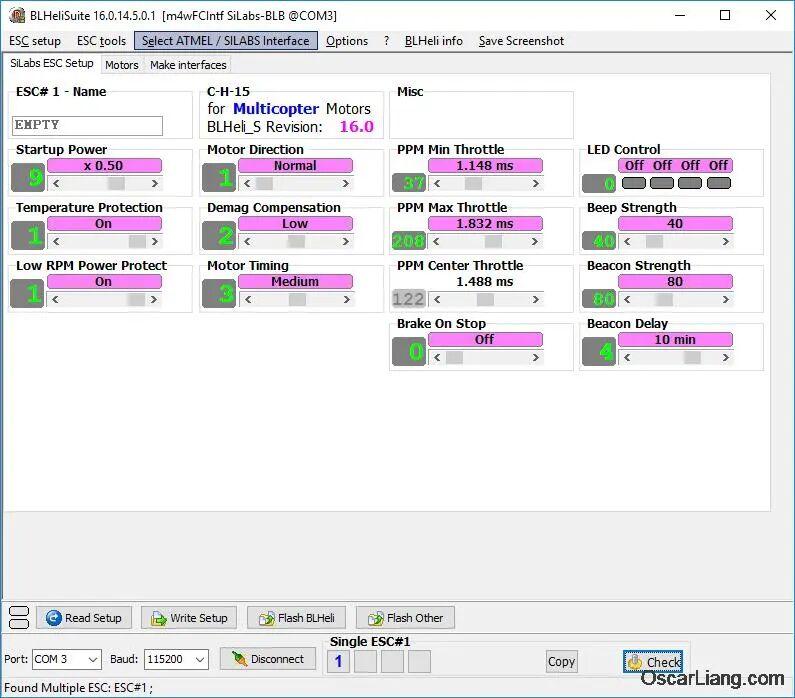
| BLHeliSuite | The veteran tool — complete feature set, dated interface |
Connecting: The Procedure
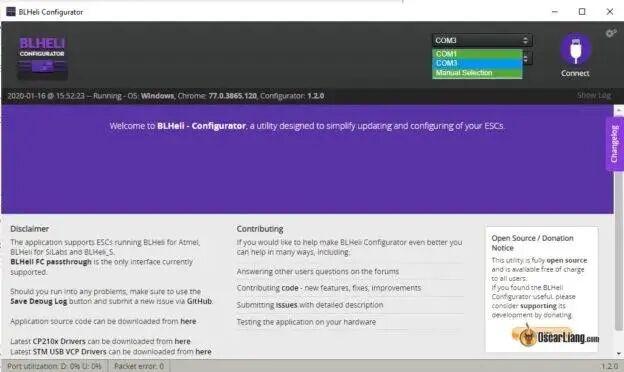
- Connect the flight controller to your computer over USB, and close Betaflight Configurator — it holds the COM port.
- Plug in a battery to power the ESCs. ESCs are not powered over USB; without the battery you will read nothing.
- Open the configurator, select the COM port and click Connect.
- Click Read Setup to pull the ESC’s current settings.
- Make your changes, then click Write Setup to save them.
Remove the propellers first. Motors will spin during connection and flashing. Props on means a quad that can cut you, and it happens on the bench, not in the air.
The Settings That Actually Matter
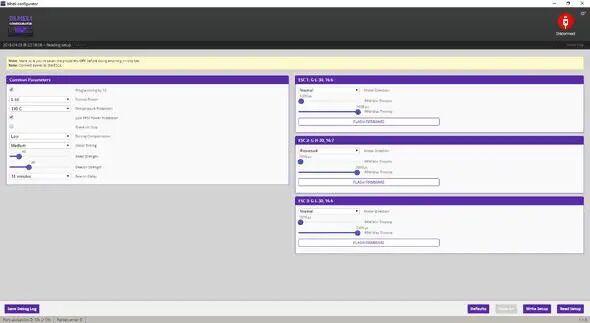
Each of the four ESCs has independent parameters. Most of them should be left alone; these are the ones worth understanding.
| Setting | What to do |
|---|---|
| Motor Timing | Leave at default. Whoops can try 15° for a little more performance. Too low causes desync, too high costs efficiency. |
| Rampup Power | How aggressively the ESC accelerates. Default is fine; lower values feel sluggish. |
| Min Startup Power | Minimum power at startup. Raise it if whoop motors struggle to spin up. |
| Max Startup Power | Maximum startup power. Set it to Min + 20. |
| Demag Compensation | Counteracts desync. Default Low is fine. |
| Beacon Strength | Volume of the lost-model beacon. |
| Brake On Stop | Active braking at zero throttle. Enable it for freestyle. |
Choosing a PWM Frequency
PWM frequency sets how many times per second the ESC switches. Higher is smoother and more efficient, but braking authority drops.
| PWM frequency | Best for | Character |
|---|---|---|
| 24 kHz | Racing | Strongest braking, most direct throttle response |
| 48 kHz | 5-inch freestyle (recommended) | Balances efficiency against braking |
| 96 kHz | Tiny whoops and small quads | Smoother small motors, slightly better efficiency |
If your 5-inch motors sound harsh at 24 kHz, try 48 kHz. Do not run 96 kHz on a freestyle quad — braking gets too weak. And remember: changing PWM frequency means reflashing the firmware, not flipping a setting.
Flashing Without Bricking the ESC
- Props off. Motors spin during the flash.
- Do not cut power mid-flash. An interrupted write is how ESCs turn into bricks.
- BLHeli_S and Bluejay flash back and forth freely — you can always roll back.
- Select the right firmware target. The wrong ESC type simply will not flash.
- Flash All writes all four ESCs in a 4-in-1 at once.
- If you do brick one, it can be recovered over the C2 interface with a USBASP or an Arduino.
Reading a Bluejay firmware filename
Bluejay files look like C_H_40_48_v21.0.hex:
- C — MCU pinout
- H — 48 MHz chip
- 40 — dead time
- 48 — 48 kHz PWM
In practice you rarely choose this by hand; the configurator detects the target for you.
Have questions about this article? Feel free to contact us at [email protected] — we’re happy to help!
Frequently Asked Questions
Will Bluejay work on my BLHeli_S ESC?
If the ESC runs a Silabs BusyBee chip (BB1, BB2 or BB5), yes — that is exactly the hardware Bluejay targets. Connect the configurator, read the setup, and it will report the detected target and the compatible firmware options before you flash anything.
Is bidirectional DShot really worth the effort?
Yes, it is the main reason to bother. Bidirectional DShot lets the ESC report motor RPM back to the flight controller, which enables the RPM filter to notch out motor noise from the gyro. On a noisy quad that is a bigger real-world improvement than most PID tuning.
Which PWM frequency should I pick?
48 kHz for 5-inch freestyle — it balances efficiency and braking. Use 24 kHz if you race and want maximum braking authority, or 96 kHz on tiny whoops where smooth small motors matter more than stopping power.
Can I brick my ESC, and can I recover it?
You can, usually by cutting power mid-flash. Recovery is possible over the C2 interface using a USBASP or an Arduino, but it means opening the quad and wiring to the chip. Prevention is simple: battery connected, props off, and do not touch the power lead until the flash finishes.
What do I change in Betaflight after flashing?
Enable bidirectional DShot in the ESC settings and turn on the RPM filter in the filter section, then verify that motor RPM telemetry appears for all four motors. If a motor shows no RPM, that ESC did not flash correctly or its signal wire is faulty.
Source: original Chinese guide on upgrading BLHeli_S ESCs to Bluejay firmware (WeChat). Original: mp.weixin.qq.com.
About Aomway
Aomway designs and manufactures FPV video transmitters, antennas, cameras and goggle systems for drone pilots worldwide, with more than fifteen years in the UAV industry. Its hardware serves racing, long-range and freestyle platforms where low-latency video and reliable RF links matter most.