

This is a must-bookmark article, especially for newcomers. We’re diving deep into the ArduPilot full parameter list for GPS — explaining every parameter in plain language with practical tuning guidance. There are quite a few GPS parameters, so this will span 2-3 articles. Feel free to use the highlight feature to mark useful sections, and message us for an electronic reference document. At Aomway, we rely on ArduPilot for our long-range FPV systems, and GPS configuration is one of the most commonly misunderstood areas.
1. GPS_AUTO_SWITCH (Auto Switch)
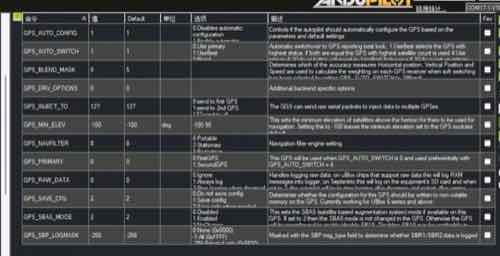
What it does: Controls how ArduPilot selects between multiple GPS units. Value 1 = Use Best (automatically picks the strongest signal); Value 2 = Blend (averages data from both GPS units for enhanced stability).
Plain English: When your flight controller has dual GPS units — say, one primary GPS and one secondary for heading reference — this parameter decides whose data to trust. Option 1 means “follow whoever has the best signal right now.” Option 2 takes the average, giving you smoother positioning.
Tuning recommendation: Stick with default 1 (UseBest). Unless you explicitly need dual-GPS fusion, letting the flight controller auto-select the strongest signal source is the safest approach.
Aircraft types: Multirotor, VTOL, fixed-wing — universal. Critical for large drones using dual GPS for heading estimation.
2. GPS_BLEND_MASK (Multi-GPS Blend Mask)
What it does: When using soft-switch (blend mode), this bitmask determines which accuracy metrics — horizontal position, vertical position, or velocity — are used to calculate weighting for each GPS receiver.
Plain English: This only activates when GPS_AUTO_SWITCH is set to 2. Think of it as a remote control deciding: should we prioritize horizontal accuracy, vertical accuracy, or velocity accuracy when merging dual GPS data?
Tuning recommendation: Keep default 5. Default value 5 means the system weights horizontal position and velocity accuracy. Only modify for highly specialized scenarios.
Aircraft types: Multirotor, VTOL. Primarily relevant for heavy-lift cargo drones or surveying UAVs requiring extreme positioning precision.
3. GPS_PRIMARY (Primary GPS)
What it does: When GPS_AUTO_SWITCH is set to 0 (disabled), this parameter specifies which GPS unit to use. 0 = first GPS, 1 = second GPS.
Plain English: If you forcibly disable the auto-selection feature, you need to manually designate a “captain.” Setting to 0 means follow GPS #1; setting to 1 means follow GPS #2.
Tuning recommendation: Default 0. Don’t change this unless you have a specific reason. Let the flight controller manage GPS selection automatically.
Aircraft types: Universal.
4. GPS_AUTO_CONFIG (Auto GPS Configuration)
What it does: Controls whether the autopilot automatically configures GPS module settings on startup. 1 = auto-configure; 0 = leave GPS at factory defaults.
Plain English: This is the “babysitter switch.” Set to 1 and ArduPilot handles all the low-level GPS configuration on power-up. Set to 0 and it leaves the GPS alone, using whatever factory settings are baked in.
Tuning recommendation: Keep default 1. For the vast majority of users, auto-configuration provides the best compatibility and requires zero effort.
Aircraft types: Universal.
5. GPS_DRV_OPTIONS (GPS Driver Options)
What it does: A powerful bitmask for advanced backend features. Bit 0: forward RTK correction data from primary GPS to secondary GPS (for moving baseline heading). Bit 3: enable direct CAN-to-CAN communication between GPS units, bypassing the flight controller CPU to dramatically reduce processing load.
Plain English: This is an advanced feature pack. It enables sophisticated low-level operations like letting the primary GPS forward RTK differential data to the secondary GPS, or having two CAN-protocol GPS units talk directly to each other without involving the flight controller at all — saving significant CPU cycles.
Tuning recommendation: Default 0 (no extra options). Only enable specific bits when using high-end RTK dual-GPS heading solutions, and always follow the hardware manual — e.g., set to 1 for moving baseline RTK.
Aircraft types: VTOL, large industrial multirotors. Used in centimeter-level positioning and precision heading applications for research or surveying.
6. GPS_INJECT_TO (Data Injection Target)
What it does: When an external ground station or network RTK service sends correction data, this parameter determines the target: inject to GPS #1 only, or broadcast to all connected GPS units.
Plain English: If you’re feeding RTK correction data from an advanced ground station, this parameter determines whether you’re feeding just one GPS or all of them simultaneously.
Tuning recommendation: Default 127 (send to all GPS). This ensures every GPS receives correction data, maximizing overall positioning accuracy.
Aircraft types: Universal.
7. GPS_SAVE_CFG (Save GPS Configuration)
What it does: Determines whether ArduPilot’s GPS configuration changes (baud rate, update rate, etc.) are stored permanently in non-volatile memory or applied temporarily (lost on reboot).
Plain English: Decides if the settings ArduPilot applies to your GPS are permanent (written into the GPS chip) or temporary (gone after a power cycle).
Tuning recommendation: Default 2 (save only when needed). This prevents accidental GPS configuration corruption from unexpected power loss while maintaining firmware upgrade compatibility.
Aircraft types: Universal.
8. GPS_MIN_ELEV (Minimum Satellite Elevation)
What it does: Sets the minimum elevation angle above the horizon for satellites to be considered valid for navigation. Satellites below this angle are excluded even if their signal is strong.
Plain English: GPS satellites are scattered across the sky. This sets a “threshold” — e.g., setting it to 10° means satellites within 10° of the horizon are ignored regardless of signal strength. This filters out low-angle signals that are easily blocked by buildings or terrain.
Tuning recommendation: Default -100 (use GPS module default). In challenging environments like urban canyons or dense forests, if GPS drift becomes excessive, try setting to 10 or 15 to force the flight controller to use only overhead satellites for improved stability.
Aircraft types: Universal. Particularly useful for FPV drones and camera drones operating in urban environments.
9. GPS_NAVFILTER (Navigation Filter Engine)
What it does: Tells the GPS chip what kind of motion profile to expect. Setting 8 (Airborne 4G) means “I’m flying and there may be 4G network interference — enable high-dynamic and anti-interference modes.” Setting 0 (Portable) means “I’m walking on the ground” — a much more conservative calculation mode.
Plain English: The GPS chip has different calculation modes optimized for different scenarios. Airborne mode expects fast movement and high dynamics. Portable mode is optimized for walking speed. Using the wrong mode for flight is like asking a marathon runner to sprint — it simply won’t perform well.
Tuning recommendation: Strongly recommend keeping default 8. Any flying drone MUST use an Airborne option. Never switch to Portable for faster satellite acquisition — it will cause signal loss during high-G maneuvers.
Aircraft types: Universal. This is the single most critical GPS parameter for preventing signal loss during aggressive flight maneuvers — a lesson every Aomway pilot learns early.
10. GPS_SBAS_MODE (Satellite-Based Augmentation System)
What it does: Controls SBAS — satellite-based augmentation systems like WAAS (US), EGNOS (Europe), MSAS (Japan). These can improve standard GPS accuracy from meter-level to sub-meter. Value 2 = don’t change current GPS SBAS settings.
Plain English: SBAS uses geostationary satellites to broadcast correction signals, boosting GPS accuracy. However, these systems are regional — WAAS covers North America, EGNOS covers Europe. In mainland China, BeiDou’s ground-based augmentation network already provides excellent coverage.
Tuning recommendation: Default 2 (NoChange). In China, leaving SBAS unchanged is safest, as some imported GPS modules struggle with Asian SBAS compatibility and may waste time searching for non-existent regional augmentation satellites, causing brief signal interruptions.
Aircraft types: Universal.
11. GPS_RAW_DATA (Raw Data Logging)
What it does: Controls whether the flight controller logs raw GPS data packets (e.g., RXM messages). These are large, unprocessed data streams invaluable for engineering-level GPS troubleshooting.
Plain English: Should the flight controller record the GPS’s “raw meat” — unprocessed data packets that are massive and cryptic? These are gold for engineers debugging GPS problems but will rapidly fill your SD card.
Tuning recommendation: Default 0 (ignore). Only enable (set to 1) when you’re experiencing persistent “Bad Compass” or “Bad GPS Health” errors and need to submit a support ticket. Reproduce the issue once, capture the data, then disable immediately.
Aircraft types: Universal.
12. GPS_SBP_LOGMASK (Swift Binary Protocol Log Mask)
What it does: Advanced logging switch specifically for Swift Navigation’s high-precision GPS modules (e.g., Piksi Multi). Masks SBP message types to determine which SBR1/SBR2 data to record.
Plain English: This is a specialized parameter exclusively for Swift-brand RTK GPS hardware. If you’re not using Swift Navigation equipment, this parameter is irrelevant.
Tuning recommendation: Default -256. Leave at default unless you’re explicitly running Swift RTK GPS hardware.
Aircraft types: Universal.
Aircraft-Specific Tuning Summary
While these parameters are universal, their practical significance varies by airframe:
Multirotors (FPV / Camera Drones)
- Core challenge: GPS signal loss during aggressive maneuvers, multipath interference in urban environments
- Priority: Ensure GPS_NAVFILTER = 8. If experiencing position drift during hover, try adjusting GPS_MIN_ELEV to filter out low-angle weak signals
Fixed-Wing (FPV / Long-Range)
- Core challenge: Positioning accuracy degradation at long range, terrain-induced signal shadowing
- Priority: Keep GPS_NAVFILTER = 8. For BVLOS operations, ensure GPS_RAW_DATA was enabled during testing to enable post-flight positioning analysis
VTOL (Vertical Takeoff and Landing)
- Core challenge: VTOLs depend on precise GPS positioning for hover during takeoff/landing transitions, while fixed-wing cruise phase demands high navigation update rates and interference resistance
- Priority: VTOLs demand the highest GPS stability. With dual GPS, strongly maintain GPS_AUTO_SWITCH = 1 — if one GPS experiences momentary interference, the backup takes over instantly. If using RTK, carefully study GPS_DRV_OPTIONS to enable the moving baseline feature
Key Takeaways
- GPS_NAVFILTER = 8 is non-negotiable for any flying drone — the single most critical GPS parameter in ArduPilot
- Dual GPS redundancy with GPS_AUTO_SWITCH = 1 provides the best safety net for VTOL and large industrial platforms
- GPS_MIN_ELEV is an underutilized tuning lever — raising it can dramatically improve stability in urban or forested environments
- GPS_DRV_OPTIONS unlocks advanced RTK features but requires careful study — don’t enable bits blindly
- Raw data logging (GPS_RAW_DATA) is a diagnostic tool, not a permanent setting — enable, capture, disable
FAQ
What’s the single most important GPS parameter in ArduPilot?
GPS_NAVFILTER. It must be set to an Airborne mode (8 recommended) for any flying drone. Using Portable or stationary modes will cause GPS lock loss during maneuvers. This is the #1 cause of GPS-related crashes that we’ve seen at Aomway.
Should I use dual GPS on a small FPV drone?
For sub-250g or racing drones, a single quality GPS with GPS_NAVFILTER = 8 is sufficient. Dual GPS adds weight and complexity better justified on larger platforms (VTOL, heavy-lift, long-range) where redundancy directly improves safety margins.
When should I change GPS_MIN_ELEV from default?
When flying in urban canyons, dense forests, or mountainous terrain where low-angle satellites are consistently blocked or reflected (multipath). Raising it to 10-15° forces the flight controller to use only high-elevation satellites, which often improves position stability in these environments.
Does GPS_AUTO_CONFIG = 2 save settings permanently?
Yes, GPS_SAVE_CFG = 2 writes configuration to the GPS module’s non-volatile memory only when necessary. The default value balances persistence with safety — it won’t save during every boot cycle, reducing flash wear and preventing corruption from power interruptions.
Is SBAS useful for drone GPS in China?
Generally no. China’s BeiDou system provides excellent native coverage, and many imported GPS modules don’t handle Asian SBAS services well. Keeping GPS_SBAS_MODE = 2 (NoChange) avoids the GPS module wasting time searching for unavailable augmentation satellites.
