

Key Takeaways: Choosing the right receiver protocol matters more than you think—SBUS is the stable professional standard, PPM is simple but outdated, iBus is Flysky’s budget-friendly option, and CRSF/ELRS is the new standard for racing drones. Each has distinct refresh rates (50–1000Hz), channel counts (8–16), latency (2–25ms), and wiring requirements. Your drone type and transmitter should drive the decision. At Aomway, we test these protocols across our own builds, and this guide reflects real flight experience.
At some point in drone flying, you’ll face the receiver protocol selection problem. SBUS, PPM, iBus, CRSF—these terms look intimidating, but they’re actually simple once you understand them. This article explains the three most basic receiver protocols thoroughly, so you can pick a receiver without hesitation.
The author has used all three protocols: the F450 + Pixhawk 4 uses SBUS with an AT9S Pro transmitter and R9DS receiver; the MARK5 racing drone uses ELRS with CRSF protocol; the 3D-printed micro drone uses PPM output with a lightweight receiver. The real-world experience differences between the three protocols are obvious.
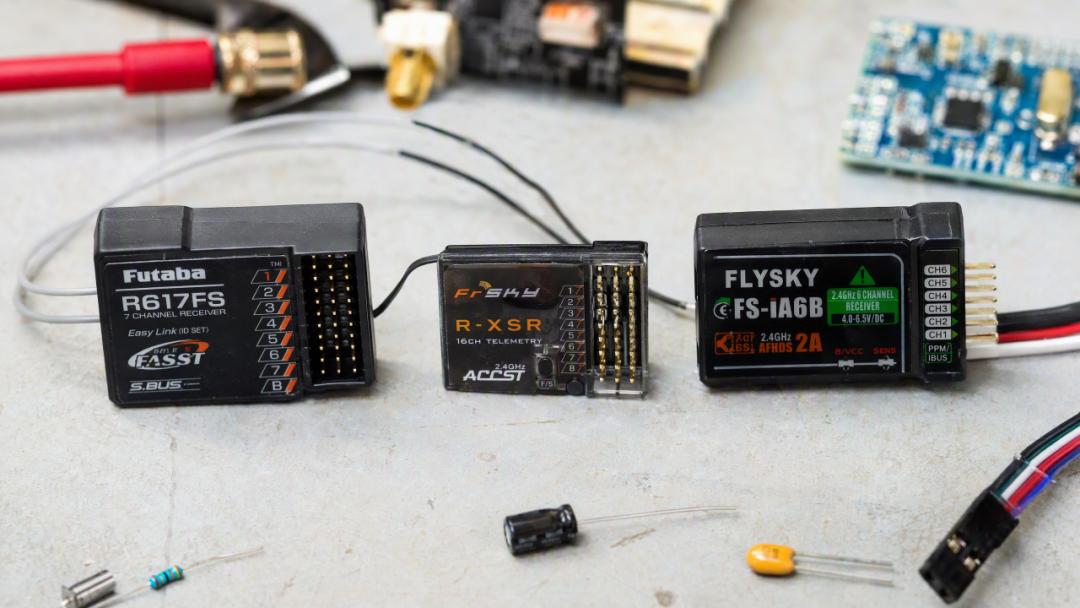
What Is a Receiver Protocol?
Let’s clarify the basic concept first. The transmitter and receiver communicate via radio signals—but how is that “signal” encoded? How do stick positions become digital data? That’s what the protocol solves.
A receiver protocol defines: how stick position data is packed, how it’s transmitted, and how the flight controller parses it. Different protocols use different encoding methods and transmission rates, which directly affect control latency, precision, and channel count.
After the receiver captures the radio signal from the transmitter, it sends data to the flight controller through a single signal wire. The signal format on that wire is the receiver protocol. SBUS, PPM, iBus, and CRSF are all signal formats transmitted on that wire.
SBUS: The Professional, Stable Veteran Protocol
SBUS (S.Bus, Serial BUS) is a serial bus protocol developed by Futaba, and it’s the most commonly used protocol for professional-grade remote controls.
Core specifications:
-
Refresh rate: 100Hz (100 frames per second)
-
Channels: 16
-
Transmission: serial single-wire
-
Signal direction: unidirectional (receiver → flight controller)
-
Signal level: inverted TTL (requires an inverter)
Technical details: SBUS transmits 25 bytes per frame: 1-byte header (0x0F) + 22 bytes of channel data (16ch × 11bit) + 1-byte status flag + 1-byte footer (0x00). At 100Hz, a frame is sent every 10ms.
Signal inversion is the key pitfall. SBUS uses inverted TTL levels—the logic of 0 and 1 is reversed compared to normal serial. Connecting SBUS directly to a regular UART pin on the flight controller won’t read anything; you must use an inverter (a simple circuit with one transistor and two resistors) to flip the signal back.
Many flight controllers (including Pixhawk 4) have a built-in inverter on the dedicated SBUS pin, so you can connect SBUS receivers directly. But if you’re using a regular UART pin, you must add an external inverter or the signal won’t be read. This is the most common rookie mistake.
SBUS pros: stable and reliable, full 16-channel functionality, industry-wide standard. Almost all professional transmitters support SBUS output.
SBUS cons: 100Hz refresh rate is slow for racing drone scenarios; 9–14ms latency is perceptible in high-speed flight. Unidirectional—the flight controller can’t send data back to the receiver (RSSI values need a separate line).
Author’s experience: The F450 uses the AT9S Pro transmitter, with the R9DS receiver outputting SBUS to the Pixhawk 4. It’s fully sufficient for aerial photography and waypoint flight; the 100Hz refresh rate is imperceptible for slow flight. The R9DS receiver has been rock-solid—hundreds of flights with zero signal issues.
PPM: The Simple but Outdated Old Protocol
PPM (Pulse Position Modulation) is one of the oldest receiver protocols, designed in the analog RC era.
Core specifications:
-
Refresh rate: 50Hz
-
Channels: multi-channel on a single wire (usually 8–12)
-
Transmission: pulse train
-
Signal level: standard TTL
Technical details: PPM works by sending a train of pulses on a single signal wire, where each pulse represents one channel. All channel pulses are chained together into a frame, separated by sync gaps.
Analogy: SBUS is like packing 16 people’s information into one express package and shipping it at once; PPM is like 16 people queuing up and walking across a single-log bridge one by one.
PPM pros: simple wiring (just one signal wire), compatible with old flight controllers, no inverter needed.
PPM cons: only 50Hz refresh rate with high latency. Low precision—each channel is represented by pulse width (1000–2000 microseconds), so resolution is limited. Inter-channel crosstalk—jitter in one channel’s pulse can affect the next channel.
Best use case: Only “lightweight” and “legacy device compatibility” remain as reasons. The author used a PPM-output ultra-lightweight receiver (under 1g) on a 3D-printed micro drone, because PPM chips are simpler, lower power, and smaller than SBUS chips. But flight performance is compromised—the 50Hz refresh rate makes the micro drone’s response noticeably “mushier” than SBUS or CRSF.
iBus: Flysky’s Budget Option
iBus is a serial protocol developed by Flysky, positioned between SBUS and PPM.
Core specifications:
-
Refresh rate: ~100Hz
-
Channels: 10 (iBus) or 14 (iBus2)
-
Transmission: serial single-wire
-
Baud rate: 115200bps
-
Signal level: standard TTL (no inverter needed)
Technical details: iBus transmits 32 bytes per frame: 1-byte length indicator (0x20) + 1-byte command byte (0x40) + 14 channels of data (16-bit resolution per channel, 28 bytes total) + 2-byte checksum. Compared to SBUS, the biggest convenience is that iBus needs no inverter—connect it directly to a UART pin and it works.
iBus pros: no inverter needed (simple wiring), 16-bit resolution higher than SBUS’s 11-bit, bidirectional transmission (iBus2 supports sensor data telemetry back to the transmitter).
iBus cons: Flysky ecosystem is relatively closed; compatibility isn’t as broad as SBUS. 10–14 channels may not be enough for some applications. Refresh rate is 100Hz, but real latency is similar to SBUS (9–12ms)—no leap forward.
Best use case: the default choice for Flysky transmitter users. If you use an FS-i6, FS-i6X, or other Flysky transmitter, iBus is the most convenient solution. Non-Flysky users have no reason to choose iBus.
Three-Protocol Comparison

| Feature | SBUS | PPM | iBus |
|---|---|---|---|
| Refresh Rate | 100Hz | 50Hz | ~100Hz |
| Channels | 16 | 8–12 | 10–14 |
| Resolution | 11-bit | ~10-bit | 16-bit |
| Latency | 9–14ms | 18–25ms | 9–12ms |
| Signal Direction | Unidirectional | Unidirectional | Unidirectional (iBus2 bidirectional) |
| Inverter | Required | Not needed | Not needed |
| Wiring | 1 wire | 1 wire | 1 wire |
| Compatibility | Broadest | Legacy | Flysky ecosystem |
CRSF: The New Standard for Racing Drones
Strictly speaking, CRSF isn’t one of the three traditional protocols, but it’s currently the de facto standard in the racing drone world, so it must be mentioned.
CRSF is a protocol developed by TBS (Team BlackSheep) for its Crossfire system, later widely adopted by ELRS and OpenTX/Taranis transmitters. Refresh rate 250–1000Hz, latency 4–6ms (2–4ms achievable with ELRS), 16 channels, bidirectional, no inverter needed.
The author’s MARK5 racing drone uses ELRS + CRSF. Compared to previous SBUS experience: stick response is noticeably faster, and the quad feels “connected” during high-speed cornering. For racing drones, CRSF/ELRS is the first choice.
How to Choose
Choose based on your use case:
Aerial photography / inspection / agriculture (F450 class): SBUS. Stable and reliable, 100Hz is sufficient, best compatibility. Pixhawk 4 connects directly to the SBUS pin—no inverter needed. The author’s F450 with SBUS + R9DS has flown hundreds of flights reliably.
Racing drones (MARK5 class): ELRS + CRSF. Low latency, high refresh rate, bidirectional communication. ELRS receivers cost only a few dozen RMB—extremely cost-effective.
3D-printed micro / ultra-lightweight drones: PPM or iBus. Weight and power consumption are the priority; PPM receivers are the lightest (under 1g). If response matters, choose iBus—slightly heavier but half the latency.
Flysky transmitter users: iBus. If you use a Flysky transmitter, don’t overthink it—iBus is the native match with the simplest wiring.
Wiring Notes
Regardless of protocol, these wiring points are universal:
-
Connect the signal wire to the correct protocol pin on the flight controller: Pixhawk 4’s SBUS pin has a built-in inverter—connect SBUS receivers directly; the PPM pin accepts PPM receivers; UART pins accept iBus/CRSF receivers.
-
Common ground: the receiver’s GND must connect to the flight controller’s GND, otherwise signal reference mismatch means no data will be read.
-
Power: receivers need 5V supply, taken from the flight controller’s 5V pin. Don’t use 3.3V—most SBUS/iBus receivers require 5V.
-
Signal wire length: keep it short, no more than 30cm. Long signal wires introduce interference; PPM is especially sensitive.
Final Recommendations
There’s no “best” receiver protocol—only “most suitable.” SBUS is stable and universal, PPM is lightweight and simple, iBus is the first choice for Flysky systems, and CRSF/ELRS is the racing drone standard. Choose the right protocol for your aircraft type and transmitter, wire it correctly, and your flight experience is guaranteed.
The most common beginner mistakes: connecting SBUS without an inverter, PPM wires too long and picking up interference, and wrong supply voltage. Before powering up, use a multimeter to confirm supply voltage and signal wire continuity—this avoids most receiver problems.
Technical data sources: official receiver protocol documentation, ArduPilot Wiki receiver configuration guides, and the author’s hands-on build experience. At Aomway, our engineers validate similar configurations daily—stable signal links are the foundation of reliable flight.
If you have any questions about this topic, feel free to contact us at [email protected]
Have questions about this article? Feel free to contact us at [email protected] — we’re happy to help!
Frequently Asked Questions
Q1: Which receiver protocol should I use for aerial photography drones?
SBUS is the best choice for aerial photography, inspection, or agricultural drones (F450 class). It offers 100Hz refresh, 16 channels, broadest compatibility, and stable reliability. Flight controllers like Pixhawk 4 have built-in inverters on their SBUS pins, so no external inverter is needed.
Q2: Why do racing drones prefer CRSF/ELRS over SBUS?
CRSF offers 250–1000Hz refresh rates with only 4–6ms latency (2–4ms with ELRS), versus SBUS’s 100Hz and 9–14ms. Racing drones need instantaneous stick response for high-speed maneuvers—the difference is clearly perceptible during fast cornering.
Q3: Does SBUS really require an inverter?
SBUS uses inverted TTL levels, so yes—unless your flight controller has a dedicated SBUS pin with a built-in inverter (like Pixhawk 4). If connecting to a regular UART pin, you need an external inverter circuit (one transistor + two resistors).
Q4: What’s the difference between iBus and iBus2?
iBus supports 10 channels unidirectionally; iBus2 supports 14 channels with bidirectional telemetry, letting the flight controller send sensor data back to the transmitter. Both use standard TTL (no inverter) at 115200bps.
Q5: Is PPM still worth using in 2026?
Only for ultra-lightweight builds or legacy compatibility. PPM’s 50Hz refresh and higher latency make responses feel “mushy.” Its only remaining advantage is simpler, lighter receiver hardware (under 1g), which suits 3D-printed micro drones where weight is critical.
