

1. MAVLink Setup & Code Generation
After defining custom communication messages in XML files, you can use the official toolchain to generate the underlying code libraries. In this project, the lower-level controller uses C, while the upper-level host uses C#. Generating the code libraries requires the official Python scripts and related dependencies. Below are the step-by-step instructions.
Prerequisites
- OS: MAVLink development is cross-platform; this guide uses Windows as the example.
- Required tools: Python 3.3+, the
futurepackage,lxml, MAVLink source code, and thepymavlinkcode generation toolkit. - Download links:
- Python: python.org/downloads
- MAVLink source: github.com/mavlink/mavlink
Installing Dependencies
Python Installation
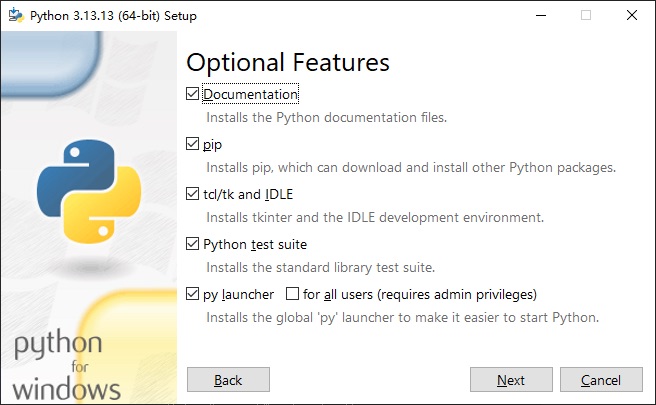
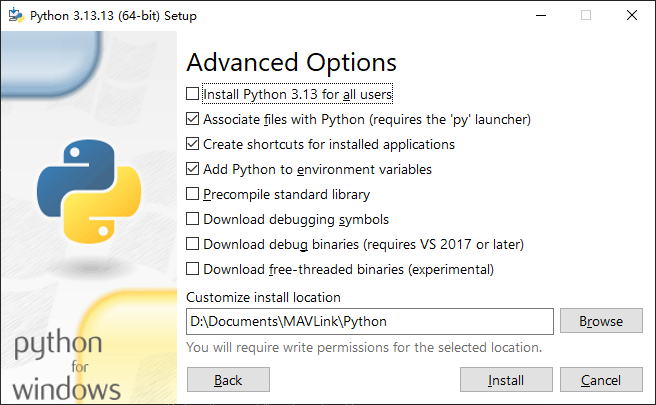
Python 3.3 or higher is required. The example below uses the Python 3.13.13 offline installer.
Installation steps:
- Run the
.exeinstaller with administrator privileges and follow the prompts. - Make sure to check “Add Python to environment variables”.
- Note: Do not install Python in a directory that contains Chinese characters in the path.
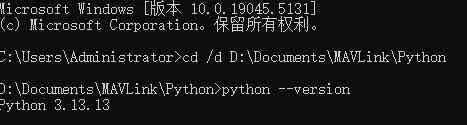
After installation, open Windows Command Prompt and run the following to verify:
python --version
Installing Dependency Packages
Open a terminal and run the following commands to install the required packages:
pip install future
pip install lxml
pip install pymavlink

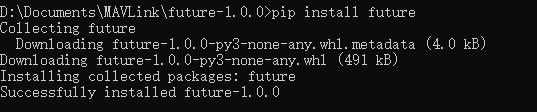
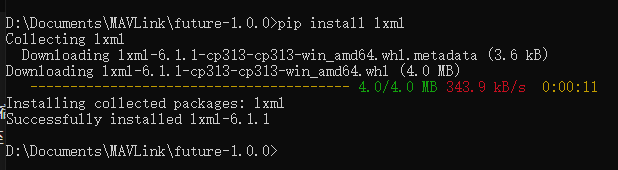
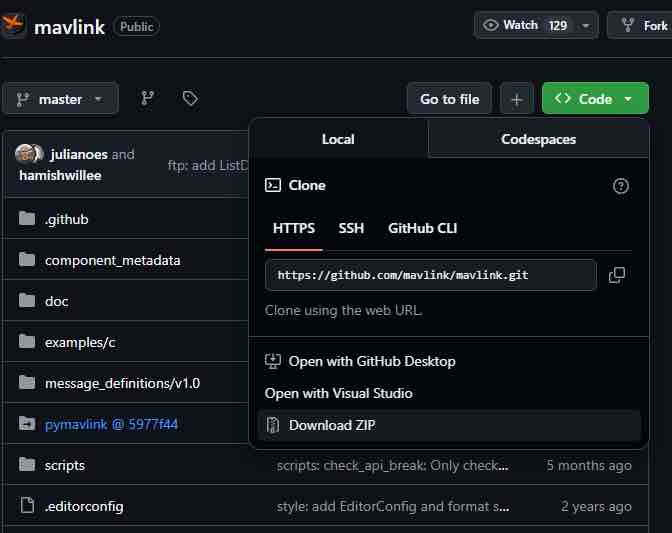
Once all dependencies are installed, download the latest MAVLink source code.
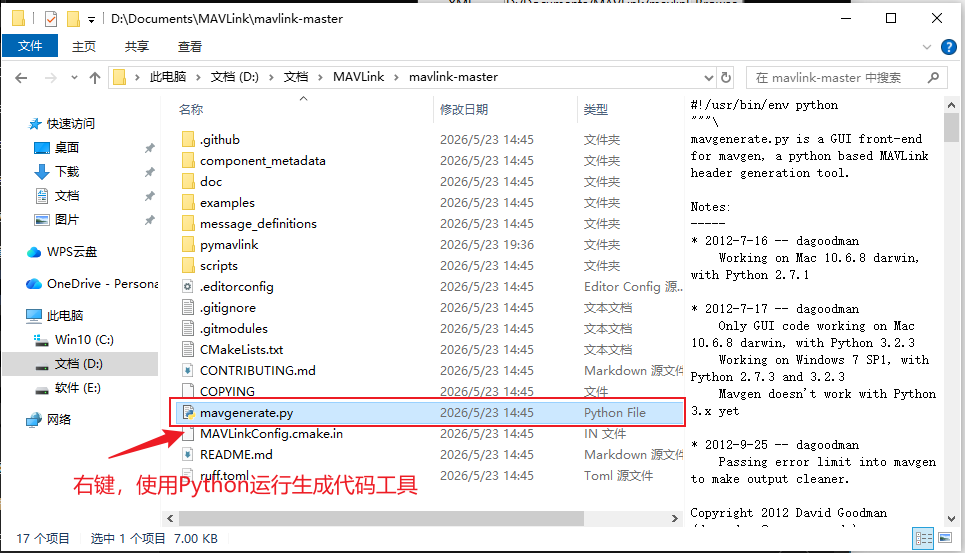
Generating Library Code
Run the code generation tool (GUI) included in the MAVLink source.
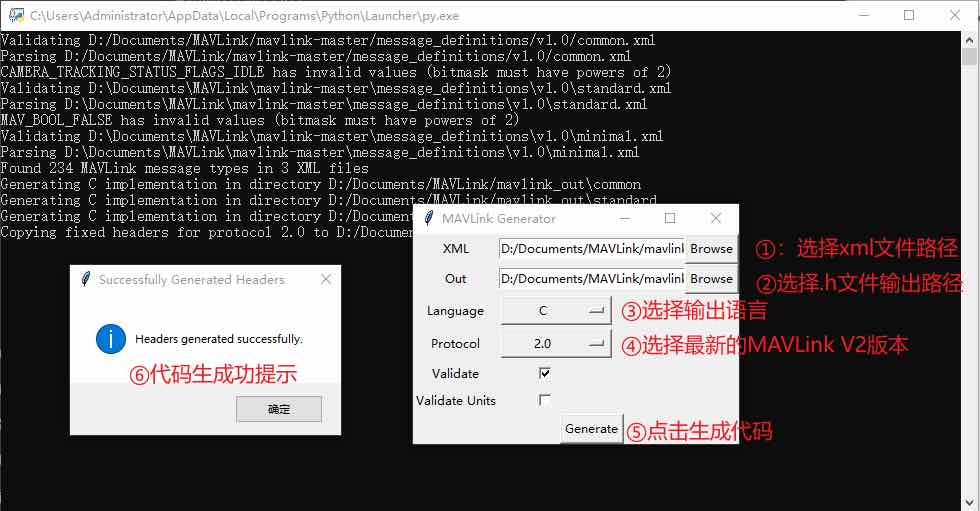
Generator UI configuration:
- XML (Input): Select the path to your XML file. This can be a custom XML or the standard
common.xmlbundled with MAVLink. - Out (Output): Choose the target directory for the generated library files.
- Language: Select the target programming language — you need to generate both C and CS (C#) separately.
- Protocol: Supports V1 and V2. Select 2.0 (V2).
Important: If your custom XML file uses
<include>tags to reference other.xmlfiles, they must be in the same folder. The recommended approach is to place your custom XML file inside the official source atmessage_definitions/v1.0/.
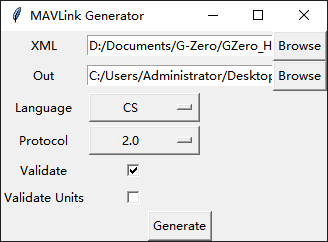
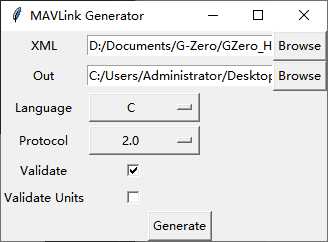
After configuring the parameters, click Generate. The complete C and C# source files will be created in the output directory.
C Library File Overview
After successful generation, the output directory contains the following key files and folders:
common/: Standard messages fromcommon.xml. Contains header files with data structure definitions, pack/send functions, and parse functions.minimal/: The minimal message set required for basic MAVLink communication (e.g.,HEARTBEAT).standard/: Official standard MAVLink message set, typically related to common vehicle commands.checksum.h: CRC calculation code for packet integrity verification.mavlink_conversions.h: Conversion functions between DCM, Euler angles, and quaternions.mavlink_get_info.h: Interface for retrieving message metadata (name, ID, length).mavlink_helpers.h: Core functions for packet construction (adding headers, computing checksums) and message parsing (receiving byte streams and extracting complete packets).mavlink_sha256.h: SHA-256 implementation for V2 message signing.mavlink_types.h: Fundamental structures (e.g.,mavlink_message_t) and enum types.protocol.h: Core macro definitions and base configuration for the protocol.[custom_name]/: All dedicated pack/unpack APIs for your custom messages.
2. Lower-Level Controller: C Library Integration
2.1 Project Setup (Keil5 Example)
- Copy the entire MAVLink folder into your project directory.
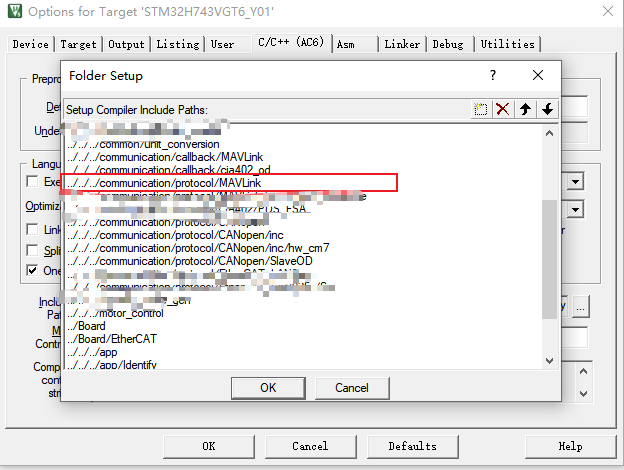
- Add the C source files to the Keil project and configure the include paths in Options for Target.
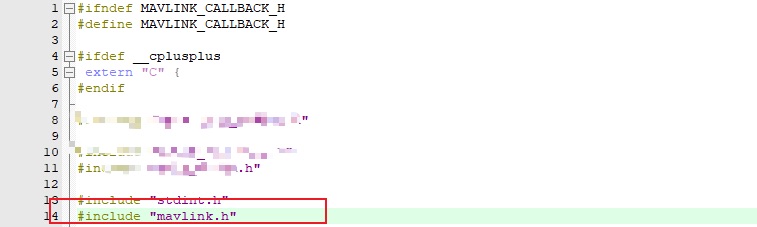
- Include the corresponding header files in any source file that uses the MAVLink API.
2.2 Message Definition & Usage
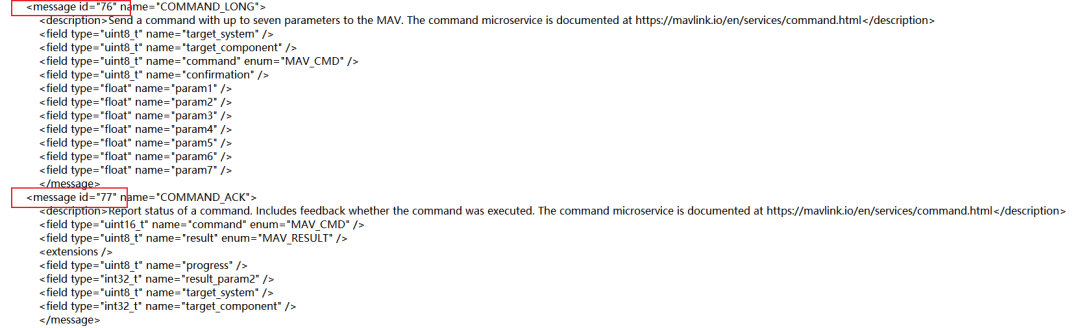
Message IDs and contents can be found in the XML file. To create custom messages, assign your own IDs (avoiding reserved and already-used numbers, staying within the allowed range).
The generated pack/unpack functions follow a consistent naming pattern: mavlink_msg_xxxx_decode and mavlink_msg_xxxx_encode.
Receiving & Parsing Packets (Unpacking)
The motor controller communicates with the host via UART. When the UART idle interrupt fires, the received data can be unpacked.
void MavlinkRecvCallback(Axis *axis, AxisDw *axis_dw, uint8_t rx_data[], uint32_t len)Single-byte state machine parsing:
Hardware data is often “sticky” or fragmented (e.g., a 10-byte message may arrive as 3 bytes then 7 bytes). MAVLink’s built-in mavlink_parse_char function handles this elegantly:
MAVLINK_HELPER uint8_t mavlink_parse_char(
    uint8_t chan, uint8_t c,
    mavlink_message_t* r_message,
    mavlink_status_t* r_mavlink_status)
for (int i = 0; i < len; i++) {
if (mavlink_parse_char(MAVLINK_COMM_0, rx_data[i], &msg, &status)) {
mavlink_flag = 1;
break;
}
}Parameters:
chan: Channel ID.c: The byte to parse.r_message: Output decoded message struct (NULL if decoding fails).r_mavlink_status: Output channel statistics including current parse state.
Return: 0 if the packet is incomplete; 1 if successfully decoded.
Decoding the Payload:
After successful decoding, r_message contains the message ID and payload. Use a switch on msgid and call the corresponding mavlink_msg_xxxxx_decode function:
case MAVLINK_MSG_ID_ScopeConfig:
    mavlink_msg_scopeconfig_decode(&msg, &scope_config);
    mavlink_scope_config_callback(&scope_config, &kScopeObject, SCOPE_WRITE);
    mavlink_msg_scopeconfig_encode(sys_id, comp_id, &send_msg, &scope_config);
    break;
Packing & Sending Messages
To send messages to other devices, pack the data into the MAVLink V2 format in two steps:
mavlink_msg_xxxxx_encode(Packing)- Create payload: Pack C variables (float, int32_t, etc.) into the payload area.
- Fill header: Automatically sets sequence number, system ID, component ID, and message ID.
- Compute checksum: Calculates and sets the CRC based on the filled data.
- Result: Assembles a complete
mavlink_message_tstruct in memory.
mavlink_msg_to_send_buffer(Serialization)- Serializes the
mavlink_message_tstruct into a flat byte array, handling little-endian conversion. - Returns the array length
len. The output can be sent directly over UART.
- Serializes the
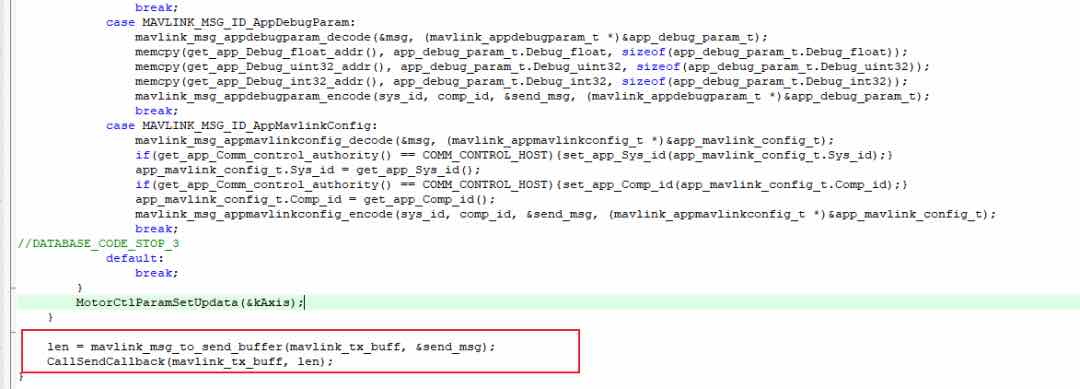
Read Parameter Flow
Entry: if(msg.msgid == MAVLINK_MSG_ID_READ_PARAM)
When the host wants to read data from the controller, it sends a single READ_PARAM command.
- Step 1: Unpack the request.
mavlink_msg_read_param_decode(&msg, &read_param);— determines which table the host wants to read (stored inread_param.struct_id). - Step 2: Fetch the data. Enter
switch (read_param.struct_id)to look up the requested data. For example, if the host wants motor config (MAVLINK_MSG_ID_PmsmConfig), the program copies inductance, resistance, pole pairs, etc. fromaxis->pmsm_configintopmsm_config_t. - Step 3: Pack for response. Call
mavlink_msg_pmsmconfig_encodeto pack the data intosend_msgfor transmission.
Write Parameter Flow
Entry: else { switch (msg.msgid) ... }
If the message ID is not “read”, it’s treated as a write command.
- Step 1: Unpack the config. Based on
msgid, enter the specific branch and call the correspondingdecodefunction to extract the new parameters into a temporary struct. - Step 2: Authority check & overwrite (critical). The program checks
if(get_app_Comm_control_authority() == COMM_CONTROL_HOST). Only when the host has control authority are the new parameters allowed to overwrite the core variablesaxis->.... - Step 3: Generate ACK. After overwriting, immediately call
encodeto pack the newly written parameters back intosend_msgas confirmation (“write successful, current values are…”). - Step 4: Apply changes. After the
switch, callMotorCtlParamSetUpdata(&kAxis);to recalculate motor control coefficients so the new parameters take effect immediately.
3. Upper-Level Host: C# Library Integration
3.1 Project Setup
Copy the generated .cs file (typically a single file containing all definitions and parsing classes) into the host project directory and add it as a dependency.
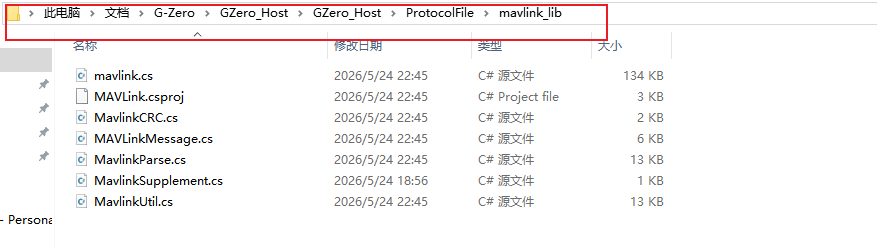
Unlike C’s byte-level approach, the C# MAVLink library provides a more object-oriented, higher-level abstraction.
3.2 Initializing the Parser
All packing and stream processing operations in C# depend on the MavlinkParse class. Instantiate it before establishing communication:
// Initialize the MAVLink parsing engine
private MAVLink.MavlinkParse _mavParser = new MAVLink.MavlinkParse();
3.3 Receiving & Parsing Packets (Unpacking)
Unlike C’s manual byte-by-byte loop, C# can pass the serial port’s BaseStream directly to the parser, which automatically extracts and validates complete MAVLink frames.
Typically, a background thread reads serial data in a loop using ReadPacket():
private void ReceiveLoop()
{
    while (_isRunning && _serialPort != null && _serialPort.IsOpen)
    {
        try
        {
            // Block-read from serial port and parse a complete message
            MAVLink.MAVLinkMessage msg = _mavParser.ReadPacket(_serialPort.BaseStream);
            if (msg == null) continue;
            // Notify upper-layer business logic
            OnMessageReceived?.Invoke(msg);
        }
        catch (TimeoutException) { continue; }
        catch (System.IO.IOException) { break; } // Normal disconnect
        catch (Exception ex)
        {
            Debug.WriteLine($"[Warning] Receive parse exception: {ex.Message}");
            continue;
        }
    }
}
Decoding the Payload:
When the upper layer receives a MAVLinkMessage, use a switch on msg.msgid and cast msg.data to the corresponding struct:
private void HandleReceivedMessage(MAVLink.MAVLinkMessage msg)
{
    switch ((MAVLink.MAVLINK_MSG_ID)msg.msgid)
    {
        case MAVLink.MAVLINK_MSG_ID.AppControlWord:
            var ctrlMsg = (MAVLink.mavlink_appcontrolword_t)msg.data;
            ushort word = ctrlMsg.Controlword;
            break;
    }
}
3.4 Packing & Sending Messages
Mirroring C’s two-step encode + to_send_buffer, C# also requires constructing a struct first, then serializing via the parser:
- Instantiate the message data struct and assign values.
- Call
GenerateMAVLinkPacket20()to serialize (auto-computes header and CRC). - Write the byte array to the serial port.
Code example (sending an application control word):
// Thread lock prevents multi-thread send collisions
private readonly object _writeLock = new object();

public void SendAppControlWord(ushort controlWord)
{
    if (_serialPort == null || !_serialPort.IsOpen) return;
    try
    {
        // 1. Instantiate message payload struct
        var ctrlMsg = new MAVLink.mavlink_appcontrolword_t();
        ctrlMsg.Controlword = controlWord;
        ctrlMsg.Halt_running_cmd = 0;

        lock (_writeLock)
        {
            // 2. Pack struct into byte stream
            byte[] txData = _mavParser.GenerateMAVLinkPacket20(
                MAVLink.MAVLINK_MSG_ID.AppControlWord,
                ctrlMsg,
                false,
                255,
                (byte)MAVLink.MAV_COMPONENT.MAV_COMP_ID_MY_CUSTOM_HOST
            );
            // 3. Write to serial port
            _serialPort.Write(txData, 0, txData.Length);
        }
    }
    catch (Exception ex)
    {
        Debug.WriteLine($"Control word send exception: {ex.Message}");
    }
}
Key Takeaways
- Two-step workflow: Define messages in XML → Generate C/C# code with the official toolchain.
- C (lower controller): Use
mavlink_parse_char()for byte-by-byte reception;encode+to_send_bufferfor sending. - C# (upper host): Use
MavlinkParse.ReadPacket()for frame extraction;GenerateMAVLinkPacket20()for serialization. - Read/Write patterns: The lower controller uses a unified
READ_PARAMmessage for reads and message-ID-based dispatch for writes, with authority checks and ACK responses. - Thread safety: Always use locks on the serial port write path to prevent data corruption from concurrent sends.
FAQ
Q1: Can I use MAVLink V1 instead of V2?
Yes, but V2 is recommended. V2 supports message signing (via mavlink_sha256.h) for secure communication, and is backward-compatible with V1.
Q2: What if my custom XML references other XML files?
Place all referenced .xml files in the same directory. The recommended location is message_definitions/v1.0/ inside the MAVLink source tree.
Q3: How do I handle “sticky packets” in C?
mavlink_parse_char() is a state machine that processes one byte at a time. It automatically handles partial and concatenated packets — just feed it bytes in order.
Q4: Can I use MAVLink over TCP or UDP instead of UART?
Yes. MAVLink is transport-agnostic. The same pack/unpack functions work regardless of whether the byte stream comes from UART, TCP, UDP, or any other transport.
Q5: Why does the C# parser use a background thread?
ReadPacket() is a blocking call. Running it on the main thread would freeze the UI. A dedicated background thread ensures responsive message reception.
