
Key Takeaways
- FlyDrones maps the 166,691-neuron MaleCNS v1.0 fruit fly connectome onto a drone’s high-level joystick commands.
- The connectome, published in Cell on 2026-09-03, spans 46 million presynaptic sites wired to 312 million postsynaptic densities.
- The browser demo runs a simplified 850-neuron circuit, not the full connectome, and opens in about 10 seconds.
- The full MaleCNS build needs a roughly 1.2 GB download and about 8 GB of free RAM.
- The code is MIT-licensed and the connectome data is CC-BY 4.0, but the authors have not flight-tested the hardware adapters.
FlyDrones puts a fruit fly brain in a drone — and you can watch it fly from a browser tab. The open-source project feeds the spiking activity of the MaleCNS v1.0 connectome into high-level joystick commands, while the drone’s own flight controller keeps the aircraft stable. As of 2026, the browser demo starts in about 10 seconds with no Python, no GPU, and no drone; only the real-hardware path costs money.
What FlyDrones Actually Does
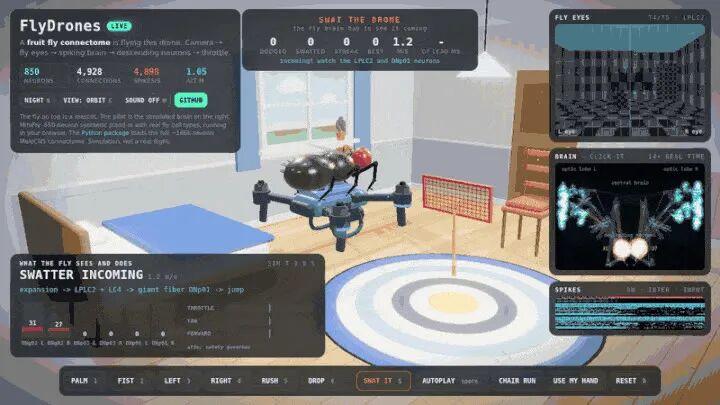
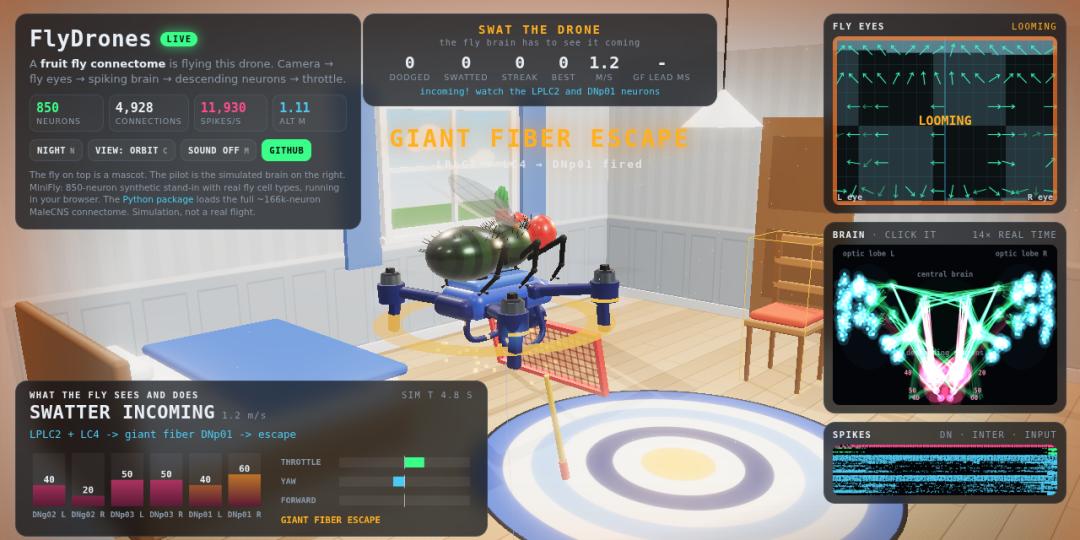
The official hero animation shows it plainly: a quadcopter hovering in a 3D bedroom, not driven by a transmitter. The readout scrolling in the corner is the simulated discharge of the MiniFly simplified circuit. Press S and you can swing a flyswatter at it, watching whether the giant-fiber neurons fire the escape reflex in time.
Hold your palm open in front of the camera and it climbs. Make a fist and it hovers. Thrust your hand at the lens and it flinches away like a real fruit fly.
A biological wiring diagram really does sit in the high-level direction loop — but FlyDrones still contains vision processing, command decoding, safety limits, and hardware adapters. Low-level attitude stabilization stays with the drone’s own flight controller.
The MaleCNS v1.0 Connectome Behind It
On 2026-09-03, teams from HHMI Janelia, the University of Cambridge, MRC LMB, and Google Research formally published the complete central nervous system connectome of the male fruit fly, MaleCNS v1.0, in Cell. The paper’s figures: 166,691 neurons, 46 million presynaptic sites connecting to 312 million postsynaptic densities, and an estimated 44 person-years of manual proofreading. The data is released under CC-BY 4.0.
FlyDrones connects that connectome model to the drone’s high-level stick commands. The repository’s GitHub API creation timestamp is 2026-09-15 20:52 UTC (04:52 Beijing time on September 16); the CHANGELOG runs to 0.1.2 (2026-09-16) even though pyproject.toml still declares package version 0.1.0. The project is MIT-licensed and ships a simulator, a MaleCNS loader, a safety module, four real-drone backends, and tests.
Three Things It Can Already Do
The official release states it directly: the browser simulation runs today, and real-drone adapter code is already provided — the connectome model only handles high-level direction while attitude stays with the drone’s own flight controller. The author has not yet completed real-hardware flight validation.
01 Fly in the browser 10 seconds after opening the page: no Python install, no drone, no GPU — just open the site and watch it fly while individual neurons fire.
02 One brain, three pilots: the official flydrones swarm command copies the same wiring diagram into three independent activity sets, each flying its own drone.
03 Swap in the real connectome at any time: download roughly 1.2 GB of official MaleCNS data, then build a filtered connectivity graph. The official dataset contains 166,691 neurons; how many survive depends on your filter conditions.
Why It Is Worth Playing With
Most of the open-source robots we covered over the past six months were “engineering camp”: cheaper structural parts, more stable control loops, faster firmware. FlyDrones is “biology camp” — the connectome model never computes motor RPM or attitude PID. Instead the project runs an electron-microscopy wiring diagram as a spiking network and lets neural activity help decide high-level stick direction.
What is most interesting is its restraint: the neural circuit only outputs high-level stick commands, attitude stabilization remains the drone’s job, and a “safety officer” outside the brain can veto anything at any moment. Dig one level deeper and you find its honesty — the authors wrote a dedicated document listing, line by line, which parts are biology and which are engineering bridges they improvised.
How It Works: Sense, Decide, Act
Read the whole chain as perceive, decide, execute. Perceive: camera frames are sliced into a compound-eye grid that computes per-cell optic flow and looming. Decide: those signals drive motion neurons inside the connectome; spikes propagate along wiring derived from synapse counts and land on several groups of descending neurons. Execute: descending-neuron firing rates are linearly converted into throttle, yaw, and forward stick values, pass through the safety officer, then go to the drone’s own flight controller.
There is no attitude PID inside the connectome model; neuron firing first passes through the project’s linear readout, command clamping, and safety officer before reaching the flight controller.
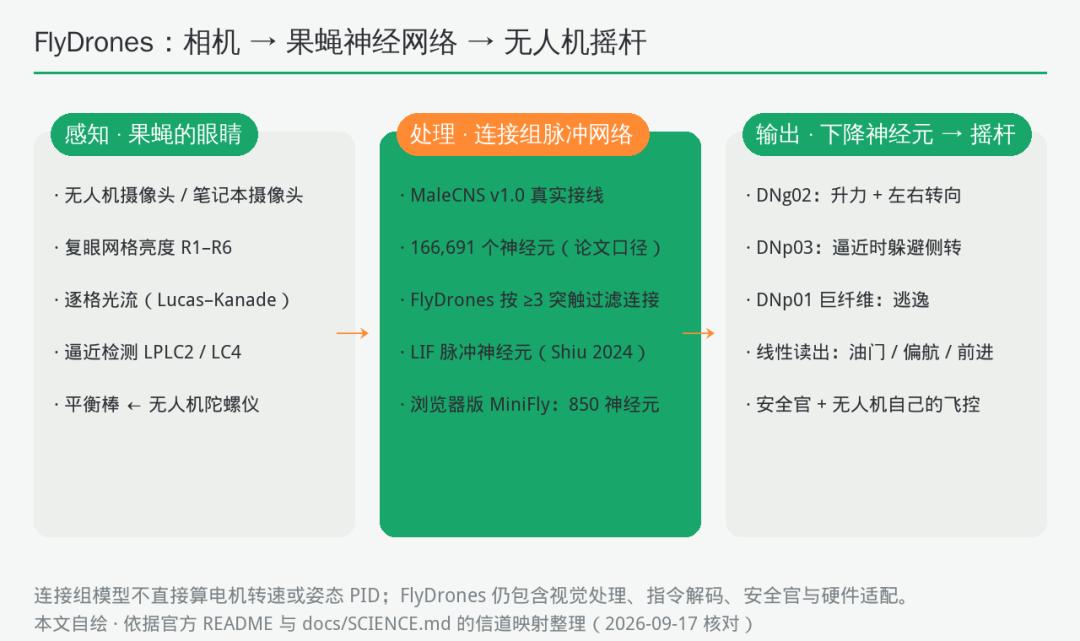
Diagram drawn for this article from the channel mapping in the official README and docs/SCIENCE.md: who handles perception (compound eyes and optic flow), who computes (the connectome spiking network), and who acts (descending neurons to stick commands, then the safety officer).
Input, Processing, Output
Input: drone camera or webcam frames, plus the drone gyro’s yaw rate — the role a haltere plays on a real fruit fly.
Processing: an ordinary laptop can run MiniFly and the sensorimotor subgraph in real time. The full MaleCNS needs about 8 GB of RAM and its speed depends on the CPU, so real-time operation is not guaranteed. Neurons use a leaky integrate-and-fire model with parameters taken from the Shiu et al. 2024 Nature fruit fly brain model; the browser version is a JavaScript implementation, and the repository tests check it against the Python version.
Output: three joystick commands ranging from -1 to 1 (climb rate, yaw rate, forward speed). On real hardware, Tello uses its official RC interface, Crazyflie uses hover setpoints, ArduPilot/PX4 uses GUIDED or OFFBOARD velocity setpoints, and Betaflight builds bridge through an ESP32 over the MSP protocol.
| Platform | Link method | Notes |
|---|---|---|
| DJI / Ryze Tello | Official RC interface | Optional real drone, ready to fly |
| Crazyflie 2.1 + Flow deck | Hover setpoint | 27 g, indoor use |
| ArduPilot / PX4 | GUIDED or OFFBOARD velocity setpoints | Over MAVLink |
| Betaflight / INAV | ESP32 bridge over MSP | Needs an add-on board |
Hardware Checklist: Get the Cost Straight First
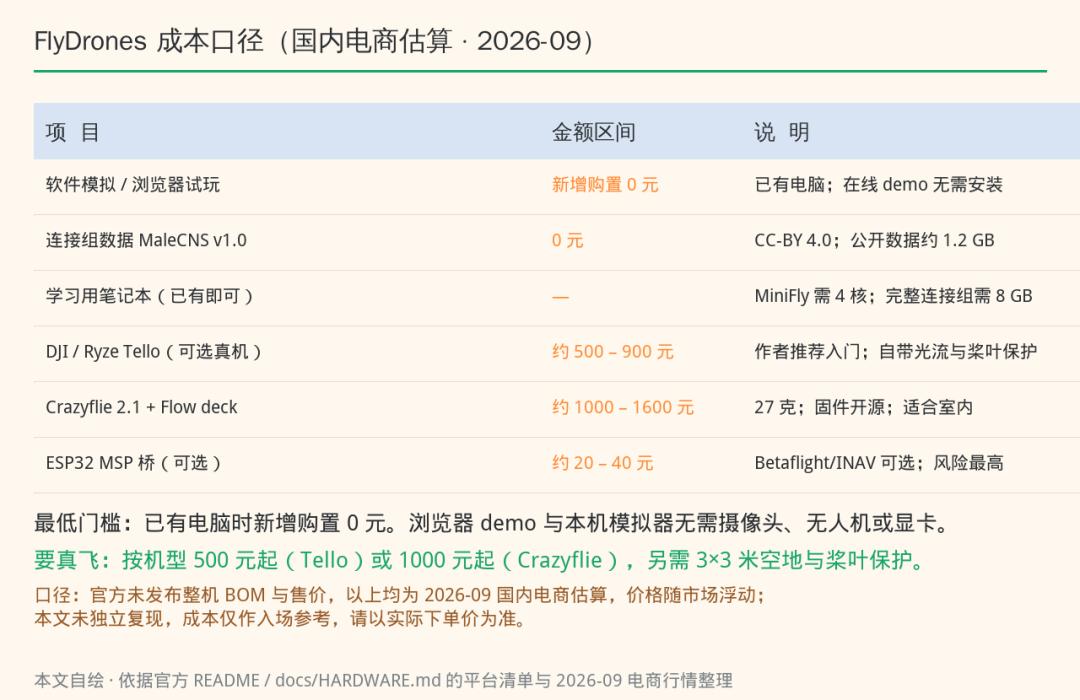
Compiled for this article from the platform list in the official README and docs/HARDWARE.md plus 2026-09 retail pricing: the 0-yuan software path and the from-500-yuan real-drone path are two different things.
- Main compute: your own laptop (a 4-core CPU runs the demo; 8 GB of RAM is recommended for the full connectome).
- Sensing and interaction: a camera (MediaPipe for gesture input, falling back to OpenCV skin detection if not installed); in real-drone mode, the drone’s own video stream.
- Execution and structure: optionally a real DJI/Ryze Tello, or a 27-gram Crazyflie 2.1 with a Flow deck, or an ESP32 bridge board added to a Betaflight/INAV quad.
- Software and services: Python 3.10 or newer; the first install, the MediaPipe hand model, and the MaleCNS data download all need internet. Once downloaded, local simulation depends on no cloud inference or LLM API. Connectome data comes from the Janelia public bucket under CC-BY 4.0.
- Cost conclusion: if you already own a computer, the browser and local simulation path can add 0 yuan in hardware purchases. That is not the same as a 0-yuan real-drone workflow, and it excludes network, power, and the computer you already have. The “from 500 yuan” figure for a real drone is a rough 2026-09 estimate from Chinese e-commerce, not an official BOM or retail price — check actual checkout prices.
One-Minute Verdict: Is It Worth Building?
Reproduction difficulty: simulator path two stars out of five (if you can install Python, you are fine); real-drone path four stars out of five (you need to understand the drone’s failsafe settings).
First successful run: about 1 minute for the web version; about 15 minutes for the local simulator (an empirical estimate from this article, affected by network and computer performance).
Full assembly: roughly 30-60 minutes from download to a working real connectome, plus another half day for real-drone debugging (an estimate, not an official promise).
Budget: 0 yuan in added hardware if you already own a computer; an optional real drone from roughly 500 yuan (2026-09 Chinese e-commerce estimate).
Prerequisites: an ordinary computer; add a camera for gestures; a clear indoor space and propeller guards to actually fly.
Who it suits: parents and teachers explaining perceive-decide-act to kids, students starting out in embodied AI, and engineers curious about neuroscience.
Shortest Reproduction Path
Step 1 – Play the web version first
Open spikecalls.github.io/FlyDrones, press S to swing the flyswatter, click any neuron group in the Brain panel on the right, and press 1-6 to try the gesture keys.
Success looks like: clicking LPLC2 makes the drone in the scene perform an escape maneuver while the spike panel bursts with activity.
If it stalls: if the page will not load, switch browsers or disable script-blocking extensions — the demo is pure front-end three.js and needs no backend.
Step 2 – Run the simulator locally
Clone the repository, create a virtual environment, pip install -e “.[vision]”, then run flydrones demo –live.
Success looks like: four panels appear — the drone camera with compound-eye grid, a live spike raster, a top-down room view, and the commands after the safety officer. Script the sequence open, fist, move right, approach, withdraw, and the drone follows with climb and turn.
If it stalls: run flydrones --version and pytest -q first to confirm you installed the full package rather than only the core.
Step 3 – Open up the brain
Run flydrones inspect; it prints how many neurons each input/output group matched, then you stimulate them one by one.
Success looks like: stimulating T4c_L (left-eye upward motion) raises firing in the DNg02 lift neuron; stimulating LPLC2_L triggers DNp01 (giant fiber) and DNp03 together.
If it stalls: a group matching 0 neurons usually means a misspelled cell type or wrong side — go back to the default groupings in configs.
Step 4 – Swap in the real connectome
flydrones download malecns (about 1.2 GB), then flydrones build-brain, then flydrones calibrate, then run the demo again with the malecns config.
Success looks like: the command prints how many neurons and connections survived your filters, and calibration reports goodness-of-fit for the lift and yaw readout weights.
If it stalls: if memory gets tight during the build, add --core-hops 3 to keep only neurons within a few hops of the path between the eyes and the descending neurons.
Step 5 – Real hardware comes last
First run the same config with –drone sim, then do a dry run against the real drone (without --send, printing commands only) to confirm every gesture maps to a sensible command direction before you add --send.
Success looks like: in the dry run, an open palm prints a positive climb command, a fist returns to 0, and a hand thrust produces one short escape climb.
If it stalls: if directions are inverted, change the readout gain or yaw saturation in the config — do not patch the connectome to compensate.
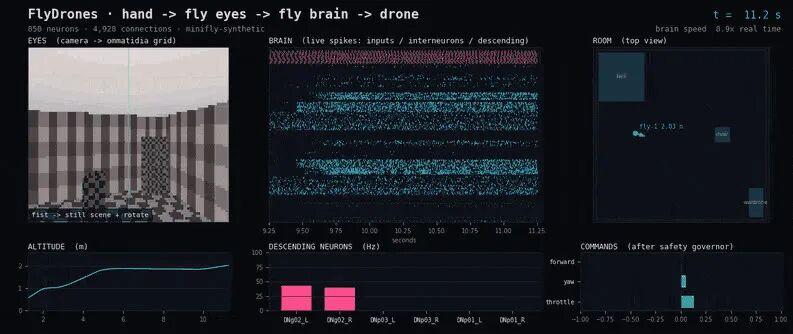
Official demo animation frame (repository assets/demo.gif): the local dashboard runs the full action sequence with scripted gestures, and the title bar honestly prints neuron count, connection count, and the brain’s real-time multiplier. Reach this point and you have completed your first successful run.
Where Beginners Get Stuck
Symptom: in the local demo, waving your hand does nothing.
Diagnose first: separate “the gesture never arrived” from “the brain did not respond” — try keyboard gesture keys 1-6, which distinguishes the two immediately.
Correct fix: if the keyboard works, it is a camera-pipeline problem: install the gestures dependency, confirm the input argument is set to gesture or both, and check whether lighting is sufficient.
Symptom: running the real connectome freezes the machine or the build aborts.
Diagnose first: the build reads a 1.1 GB synapse weight table and peaks at roughly 6 GB of free memory; running short on either disk or RAM will fail it.
Correct fix: start with --core-hops 3 for the sensorimotor core, then consider the whole brain; the download supports resume, so re-running does not start from zero.
Symptom: after takeoff the real drone drifts upward on its own, or triggers escape maneuvers constantly.
Diagnose first: decide whether the static baseline drifted or the readout gain is too high — check whether the static segment of the dry-run log shows commands near 0.
Correct fix: for static drift, extend calibration time or adjust the DNg02 baseline drive offset; for excessive escapes, raise the escape threshold and the looming lower bound, and cap maximum throttle at 30 percent first.
How You Could Mod It
Beginner mods change config, not code. Raise the cruise forward speed so it goes from hovering in place to tracing a lap along the room’s edge; or turn off the scripted hand and use gesture keys as a remote, performing “flying a drone with a hand-fed fruit fly” for your family.
Intermediate mods swap the fly for another brain. The repository’s Drone interface has only five methods — takeoff, send command, read telemetry, grab frame, land — so writing your own subclass lets you wire the same neural circuit to a car, a boat model, or even a robotic arm. People in the community have already connected it to games and simulated bodies.
Advanced mods add plasticity to the connectome. The official documentation states plainly that it does not learn today and the weights are fixed, with dopamine-like plasticity on the roadmap — exactly the opening for a course project or a small research topic: teach the fruit fly to avoid a fixed obstacle and watch how the weights change.
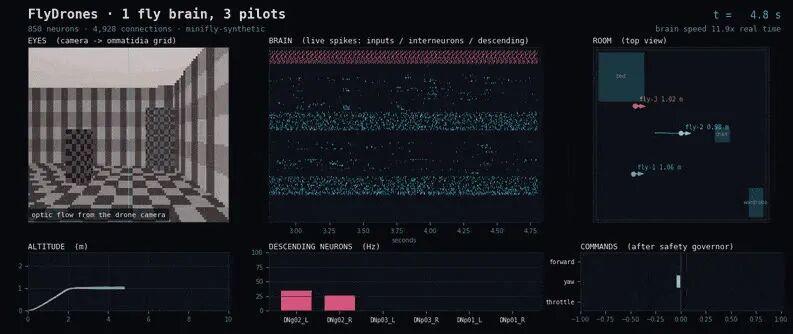
Official demo animation frame (repository assets/swarm.gif): one wiring diagram copied into three brains, each flying its own drone. The author also notes that true swarming needs inter-drone collision avoidance, which the project does not yet include.
Cool-Headed Reminders: Boundaries and Safety
Safety warning: this is not a toy. Spinning propellers can cut people and pets, and lithium batteries dislike impacts and overcharging. Indoor test flights require propeller guards, a cleared 3 m by 3 m area, nobody standing in front of the aircraft, and the manufacturer’s app or transmitter in hand for immediate takeover. Outdoor flight means checking local registration and no-fly-zone rules first, and never flying over crowds, roads, or animals. The repository defaults to dry-run mode and only sends real commands when you add --send — keep that habit until you are completely certain the commands are correct.
Three things also need separating. First, this is a computational model, not a revived fruit fly: the wiring comes from electron-microscopy data, the dynamics use standard spiking neuron models, and the model has no dendrites, no neuromodulators, and no plasticity — it cannot be conscious. Second, the engineering boundaries are very real: motion vision is software-computed optic flow that bypasses the real fly’s early visual layers; the loop runs at 20-50 Hz while a real fruit fly beats its wings about 200 times per second; and the author’s own hardware adapters remain unvalidated in flight. Third, the web demo runs an 850-neuron simplified circuit, not the 166,691-neuron connectome — to see the real thing, run build-brain locally.
Original Project and Sources
• Author/maintainer: SpikeCalls (FlyDrones contributors)
• License and data-license boundary: FlyDrones code is MIT (repository root LICENSE); MaleCNS data is CC-BY 4.0 — do not conflate the two (verified 2026-09-17 for this article)
• Official repository: https://github.com/SpikeCalls/FlyDrones
• Online demo: https://spikecalls.github.io/FlyDrones/
• Brain data (MaleCNS v1.0, CC-BY 4.0; official paper figure 166,691 neurons): https://male-cns.janelia.org/
• Source institution page: https://www.janelia.org/project-team/flyem/male-cns-connectome
• MaleCNS paper (published version): https://www.cell.com/cell/fulltext/S0092-8674(26)00942-6
• Science notes (what is biology and what is an engineering bridge): https://github.com/SpikeCalls/FlyDrones/blob/main/docs/SCIENCE.md
• Media note: project visuals come from the repository’s original GIF/PNG assets; the structural diagram and cost card were drawn for this article with PIL. No AI-generated images were used.
• Build guide and hardware list: https://github.com/SpikeCalls/FlyDrones/blob/main/docs/GUIDE.md
Which would you rather see: A) wiring this fruit fly brain to a wheeled robot and swapping “can fly” for “can navigate around obstacles,” or B) taking MaleCNS apart to see how the 166,691 neurons relate to the paper’s synapse counts?
Anything can be built. Leave a comment and tell us what else you want turned into a new AI toy.
Have questions about this article? Feel free to contact us at [email protected] — we’re happy to help!
Frequently Asked Questions
What is FlyDrones?
FlyDrones is an open-source project that connects the MaleCNS v1.0 fruit fly connectome to a drone’s high-level stick commands. The connectome model decides direction while the drone’s own flight controller handles attitude, and a separate safety module can veto any command.
How many neurons does the fruit fly connectome have?
The MaleCNS v1.0 dataset published in Cell on 2026-09-03 contains 166,691 neurons, with 46 million presynaptic sites connecting to 312 million postsynaptic densities. The authors estimate 44 person-years of manual proofreading. Note that the browser demo runs a simplified 850-neuron circuit, not this full dataset.
Can I run FlyDrones without buying a drone?
Yes. The browser demo runs entirely client-side and needs no Python, GPU, or drone. A local simulator also runs on an ordinary laptop and takes about 15 minutes to set up. Hardware cost only appears if you choose to fly a real aircraft, which the project estimates at roughly 500 yuan and has not flight-validated.
What computer do I need for the full MaleCNS connectome?
Plan for roughly 8 GB of free RAM and a 1.2 GB data download. A 4-core laptop handles the demo and the MiniFly circuit in real time, but the full connectome’s speed depends on your CPU and real-time operation is not guaranteed. Add --core-hops 3 if memory runs short.
Is FlyDrones safe to fly indoors?
Only with precautions. Fit propeller guards, clear a 3 m by 3 m area, keep people away from the front of the aircraft, and hold the manufacturer’s app or transmitter ready to take over. The repository defaults to dry-run mode and only sends real commands when you add --send.
About Aomway
Aomway is a technology company specializing in drone and FPV equipment, publishing in-depth analyses of motor control, embedded hardware, and open-source robotics projects. With over 15 years of industry experience, Aomway covers the full spectrum from flight controllers and FPV goggles to thermal imaging cameras and long-range datalinks for the global drone community.